
Last Updated on April 6, 2026 by Luis Cooper
Losing weight sounds simple on paper.
Eat less than you burn.
But anyone who has actually tried it knows the real problem is not the math — it is the tracking.
Most people underestimate what they eat by 30 to 40 percent, and most fitness trackers do not make it easy enough to stay on top of both sides of the equation.
The best smartwatch for calorie counting is not just the one with the most workout modes.
It is the one that gives you accurate daily calorie burn data, connects cleanly with a food logging app, and makes the whole process simple enough that you actually keep doing it past week two.
This guide is specifically for people managing their weight through calorie awareness — tracking what they eat, understanding their daily burn, and staying in a consistent calorie deficit.
It is a different goal from pure fitness tracking, and it needs a different approach.
Which is the Best Smart Watch for Calorie Counting?
Here is my recommended top 5 Best Smart Watches for Calorie Counting:-
![Apple Watch Series 11 [GPS 46mm] Smartwatch with Jet Black Aluminum Case with Black Sport Band - M/L. Sleep Score, Fitness Tracker, Health Monitoring, Always-On Display, Water Resistant](https://m.media-amazon.com/images/I/416RQ0rtsUL._SL160_._SL160_.jpg)



What Actually Determines Calorie Counting Accuracy:
Every smartwatch estimates calories — none of them measure it directly.
Understanding how those estimates are generated helps you choose the right watch and set realistic expectations for the numbers you see.
Heart rate is the most important input:
A watch that monitors your heart rate continuously throughout the day — not just during logged workouts — builds a far more accurate picture of your total daily calorie burn than one that only tracks steps.
Your resting metabolic rate accounts for 60 to 70 percent of your total daily calories, and heart rate data is essential to estimating it accurately.
Passive calorie tracking matters as much as workout data:
The calories you burn commuting, cleaning, cooking, and walking between meetings add up significantly across a week.
A watch that tracks this movement accurately — not just formal exercise sessions — gives you a realistic view of your energy output.
App integration is what makes it practical:
The best calorie-counting setup is one where your watch automatically updates your food app’s daily calorie budget after you exercise, so you never have to manually calculate how much you can eat afterward.
If that sync is not seamless, most people stop using it within a few weeks.
1. Apple Watch Series 11: (Best for iPhone Users Managing a Calorie Deficit)

For iPhone users who track what they eat, no watch on the market connects to more food and calorie apps than the Apple Watch Series 11.
MyFitnessPal, Lose It!, Cronometer, Yazio, and Lifesum all sync directly with Apple Health, so your calorie-burn data automatically feeds into your food app after every activity.
Log a workout on your watch, and your food app’s daily calorie budget adjusts without you doing anything manually.
That automation removes the friction that causes most people to abandon calorie tracking.
The Activity Rings system gives you three visual goals every day — Move, Exercise, Stand — and the Move Ring specifically tracks your active calorie burn in real time.
If you close your rings consistently, you have a reliable daily calorie reference point that stays honest whether you had a light day or a heavy training session.
The S10 chip powering the Series 11 processes health data significantly faster than older generations, so heart rate readings update quickly during workouts and calorie calculations reflect your actual effort rather than lagging.
For steady cardio activities, calorie data from the Series 11 is consistently reliable across independent testing.
Sleep tracking is built in and runs automatically.
Since sleep quality directly affects hunger hormones, specifically ghrelin and leptin, having that data alongside your daily calorie burn gives you a more complete picture of why some days you are hungrier and more likely to exceed your calorie target.
One limitation every iPhone user should know before buying: the Apple Watch Series 11 has an 18-hour battery life in regular use.
This means you will charge it daily.
For people who also want overnight sleep tracking, you need to build a charging window into your morning routine — thirty minutes while you shower and get ready is enough to top it up.
If you want to know more about how the Apple Watch performs across water activities while tracking your health, the detailed guide at is-apple-watch-waterproof covers what each model can handle.
Who should buy this:
iPhone users who are actively counting calories using a food logging app and want the most seamless integration available between a watch and nutrition tracking.
Who should skip this:
Android users — Apple Watch does not pair with Android phones at all.
Specifications:
| Feature | Details |
|---|---|
| Display | 1.69″ LTAO AMOLED, Always-On |
| Case Sizes | 42mm and 46mm |
| Battery Life | 18 hours / 36 hours Low Power Mode |
| Water Resistance | 50m, swimproof |
| Heart Rate | Continuous, ECG capable |
| Calorie Tracking | Active and resting calories, Ring system |
| App Sync | MyFitnessPal, Lose It!, Cronometer, Lifesum, all Apple Health apps |
| GPS | Built-in dual-frequency |
| Compatibility | iPhone only |
2. Garmin Forerunner 165: (Best for Runners Who Count Calories Seriously)

Most calorie counting guides focus on casual users.
But runners and regular gym-goers face a different problem: the harder you train, the more important it becomes to actually understand your calorie output accurately so you can fuel properly, maintain a manageable deficit, and not sabotage your recovery.
The Garmin Forerunner 165 is built for exactly that user.
The Elevate V4 heart rate sensor runs continuously, and Garmin’s calorie calculation algorithm has been refined across decades of sports tracking.
In practical terms, what this means is that the calorie numbers during running are among the most reliable of any watch at this price.
A reviewer who wore it alongside a chest strap during a marathon training cycle found the calorie estimates consistent across different types of runs — easy recovery jogs, tempo runs, and long slow distance — with none of the wild swings that affect cheaper trackers.
The standout feature for calorie counters who also train seriously is the sync with MyFitnessPal.
Connect your Garmin Connect account to MyFitnessPal once and every workout you complete automatically updates your daily calorie budget in the app.
Run 8 kilometers in the morning and MyFitnessPal shows you exactly how many additional calories that gives you to work with for the rest of the day, without any manual calculations.
This is the most practical calorie management integration available for Android and iPhone users outside of the Apple Watch ecosystem.
The Morning Report that appears when you wake up each day shows your sleep quality, HRV status, body battery level, and weather — giving you context for your calorie goals before you even get out of bed.
If you slept poorly and your body battery is depleted, your appetite will likely be higher and your planned workout harder.
Having that awareness changes how you approach your food logging for the day.
Battery life of up to 19 days in smartwatch mode — real-world testing with daily GPS runs lands around 7 to 10 days — means extended tracking without charging gaps.
For anyone building a multi-week data set to understand their calorie patterns, this matters.
Who should buy this:
Runners, walkers, and active people who want accurate workout calorie data that syncs automatically with MyFitnessPal, alongside the training analytics to understand their fitness progress.
Who should skip this:
People who primarily do indoor gym workouts and have no need for GPS accuracy, or anyone who wants smart features like Bluetooth calling or third-party apps.
Specifications:
| Feature | Details |
|---|---|
| Display | 1.2″ AMOLED, 390x390px |
| Case Size | 43mm |
| Weight | 39g with band |
| Battery Life | Up to 19 days smartwatch / 19 hours GPS |
| Water Resistance | 5ATM (50m) |
| GPS | Multi-GNSS, all major satellite systems |
| Heart Rate | Elevate V4 continuous |
| Calorie Tracking | Active and resting calories, sport-specific algorithms |
| Health Features | Body Battery, HRV, sleep, stress, Morning Report |
| App Sync | MyFitnessPal direct sync, Strava, Apple Health, Google Health Connect |
| Compatibility | Android and iPhone |
| Subscription | None required |
3. Amazfit Active 2 Sport: (Best Value Smartwatch for Calorie Tracking)

Getting started with calorie counting does not require spending hundreds of dollars on a watch.
The Amazfit Active 2 brings the essential features that actually drive calorie deficit results — accurate daily calorie burn, continuous heart rate monitoring, GPS for outdoor activity, and app integration — at a price that removes the financial barrier that stops many people from starting.
The BioTracker 6.0 sensor powers continuous heart rate throughout the day.
In independent testing where the Active 2 was worn alongside an Apple Watch Ultra 2 during a 34-minute run, the GPS route matched exactly and the distance was accurate to two decimal places.
For a watch at this price level, that GPS precision during outdoor calorie-tracked sessions is genuinely unexpected.
The Zepp app works with Apple Health on iPhone and Google Health Connect on Android.
This means your Active 2 calorie burn data can feed into whichever food logging app you use on either platform — Cronometer, MyFitnessPal via Health Connect, Lose It!, and others all pick up the data automatically once connected.
The integration is not as direct as native Garmin-to-MyFitnessPal sync, but it works and requires no manual data entry once set up.
The readiness score each morning pulls together your sleep quality, HRV, and previous day’s activity into a single number that tells you whether your body is ready to push or needs a lighter day.
For calorie counters who are also managing their training load, this daily signal is genuinely useful context alongside your food tracking.
Zepp Flow, the AI assistant on Android, allows you to reply to messages, check your health stats, and control the watch by voice.
Asking “how many calories did I burn today?” and getting a spoken answer without touching the screen is a small feature that ends up being more useful day-to-day than it sounds.
The 10-day battery means you are charging roughly twice a month in standard use — significantly less than smartwatches from Samsung, Apple, or Google.
Who should buy this:
Anyone starting their calorie counting journey who wants a capable, affordable watch with GPS, food app integration through Apple Health or Google Health Connect, and solid everyday health tracking.
Who should skip this:
Anyone who needs native MyFitnessPal sync without routing through a health platform, or who wants Wear OS app access.
Specifications:
| Feature | Details |
|---|---|
| Display | 1.32″ AMOLED, 466x466px, 2000 nits |
| Case Size | 44mm (round) |
| Weight | Under 30g without band |
| Battery Life | Up to 10 days standard / 19 days battery saver |
| Water Resistance | 5ATM (50m) |
| GPS | 5 satellite systems, new antenna design |
| Heart Rate | BioTracker 6.0 continuous |
| Calorie Tracking | Active and resting calories, readiness score |
| Health Features | Heart rate, SpO2, sleep, stress, HRV, skin temperature |
| Sports Modes | 160 plus including strength training with auto rep counting |
| App Sync | Apple Health, Google Health Connect, Strava |
| Smart Features | Bluetooth calls, Zepp Flow AI voice replies, offline maps |
| Compatibility | Android and iPhone |
| Subscription | None required |
4. Polar Pacer Pro: (Best for Serious Calorie Management With Training Science Behind It)
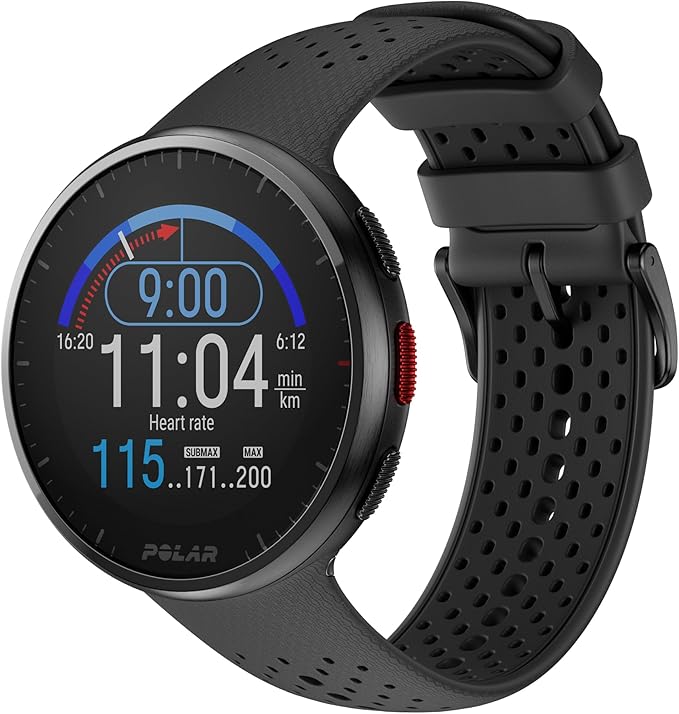
Polar has been measuring calorie burn longer than any brand on this list.
The company started developing heart rate technology for sports research in the 1980s, and that depth of science shows in how the Polar Pacer Pro approaches calorie data.
It does not just give you a number — it gives you the context to understand what the number means and what to do about it.
The Precision Prime dual optical sensor system combines optical heart rate measurement with a skin contact sensor that detects how consistently the watch is sitting against your wrist.
If the fit loosens during a workout, the sensor detects it and adjusts the reading rather than reporting inaccurate data that skews your calorie total.
During cycling and running comparisons against a chest strap, the Pacer Pro’s calorie estimates consistently ranked among the most accurate of any wrist-based watch tested.
Polar’s nightly Nightly Recharge feature is one of the most useful tools for serious calorie counters.
It measures your autonomic nervous system recovery during sleep — specifically HRV and breathing rate — and gives you a recovery status each morning alongside an updated daily activity guideline.
The recommendation tells you whether to push hard, train lightly, or prioritize rest.
For anyone managing weight through a calorie deficit while also training, this prevents the common mistake of over-training on under-recovered days, which drives up hunger and makes it far harder to maintain your calorie targets.
The Training Load Pro feature tracks how much cumulative training stress you are accumulating across cardio and muscle load separately.
For people doing a combination of running and gym work, seeing both types of training load plotted over time helps you understand why some weeks feel harder, why you eat more on certain days, and how to adjust both your training and your calorie intake accordingly.
Polar Flow, the companion app, syncs with MyFitnessPal directly. Your workout calorie data transfers automatically and updates your daily food budget in real time.
The Polar Flow app itself has a clear food diary integration option, and combined with MyFitnessPal’s 14 million food database, you get a complete calorie management system.
The watch uses a lightweight nylon build at 32 grams that wears comfortably during long training sessions and all-day use.
Battery life of up to 35 hours in GPS mode means ultra marathon coverage without recharging, and 4 to 7 days in daily use mode handles a full training week on one charge.
Who should buy this:
Regular runners, cyclists, and athletes who want scientifically grounded calorie data, detailed training load tracking, MyFitnessPal sync, and recovery analytics to support serious weight management alongside performance goals.
Who should skip this:
Casual users who want a simple calorie counter — the depth of data here is genuinely powerful but requires time to understand and use well. Also no touchscreen — navigation is button-only.
Specifications:
| Feature | Details |
|---|---|
| Display | 1.2″ MIP transflective |
| Case Size | 43mm |
| Weight | 32g without band |
| Battery Life | Up to 7 days smartwatch / 35 hours GPS |
| Water Resistance | 5ATM (50m) |
| GPS | Dual-frequency, all major satellite systems |
| Heart Rate | Precision Prime dual optical with skin contact detection |
| Calorie Tracking | Active and resting calories, Training Load Pro, Nightly Recharge |
| Health Features | HRV, sleep, breathing rate, autonomic nervous system recovery |
| Sports Modes | 130 plus including running power and cycling power |
| App Sync | MyFitnessPal direct sync, Strava, Training Peaks, Apple Health |
| Compatibility | Android and iPhone |
| Subscription | None required for core features |
6. Oura Ring 4: (Best for Calorie Counting Without Wearing a Watch)

Most people who struggle with calorie counting are not failing at the math.
They are failing at the consistency.
They forget to wear the tracker, take it off during sleep, leave it on the charger for a day, or find it uncomfortable enough that it gradually migrates from their wrist to a drawer.
The Oura Ring 4 solves that specific problem better than any watch on this list — because you genuinely forget it is there.
At roughly the size of a wedding band, the Ring 4 is made entirely from titanium and sits on your finger like a piece of jewelry.
There is no screen, no buttons, no charging every night.
Most people charge it once a week while showering.
The result is a device that gets worn 24 hours a day, 7 days a week, including during sleep, without ever feeling like a chore.
For calorie counting, that consistency matters more than people realize — because your most important calorie data comes not from your one-hour workout but from the other 23 hours of your day.
How It Actually Tracks Calories:
The Ring 4 calculates your total daily calorie burn using metabolic equivalents — a measure of how much energy different activities require relative to rest.
It uses finger-based heart rate data, movement intensity from the accelerometer, and your personal baseline to estimate both resting and active calorie burn throughout the day.
Independent scientific validation found a strong correlation between Oura’s calorie estimates and indirect calorimetry measurements in laboratory conditions, with an average error of around 13 percent.
That is a meaningful number to understand: it means if the ring says you burned 2,200 calories in a day, the actual figure was likely between 1,900 and 2,500. For managing a calorie deficit over weeks and months, this level of accuracy is still genuinely useful — as long as you treat it as a consistent daily reference point rather than a precise medical reading.
Where the ring genuinely pulls ahead of wrist-based trackers is passive calorie tracking throughout the full day.
The finger position gives it stable, continuous contact with your skin without the wrist motion artifacts that affect smartwatch readings during everyday activities like typing, cooking, and carrying things.
If you want to understand your true baseline calorie burn — how many calories your body actually needs just to get through a normal day — the Oura Ring collects that data more consistently than most wrist devices.
The Readiness Score Changes How You Approach Calorie Targets:
The most underrated feature for anyone counting calories is the daily Readiness Score. Every morning it pulls together your sleep quality, HRV, resting heart rate, and body temperature trends from the previous night and gives you a score between 0 and 100.
A high readiness score means your body has recovered well and can handle a bigger training session.
A low one means your body is under stress — and crucially, that means your hunger levels are likely to be higher and staying within your calorie target will be harder.
Most calorie counting approaches treat every day the same.
The Ring 4 shows you why they are not.
Knowing that Tuesday was a poor recovery day before you start logging food gives you context for why you might be craving more calories — and helps you decide whether to adjust your target or push through, rather than treating a hungry day as a personal failure.
The Oura app also connects with Apple Health on iPhone and Google Health Connect on Android.
Your daily calorie burn data feeds through to whichever food logging app you use, whether that is MyFitnessPal, Cronometer, or Lose It!, updating your daily budget without manual entry.
Where It Falls Short — And You Need to Know This:
The Oura Ring 4 is honest about what it is not. There is no GPS, no real-time display, and no workout coaching.
During high-intensity activities like weightlifting and HIIT where your hands are constantly gripping and moving, the optical heart rate sensor can lose contact and produce less reliable calorie data for that specific session.
Many Oura users who train seriously wear the ring for sleep and all-day recovery tracking and use a separate wrist device or chest strap during actual workouts — then let both data sources feed into the same app for a complete picture.
Step counting is also consistently lower than wrist-based devices, not because it is wrong but because Oura filters out non-step movement from the finger rather than counting all wrist swings as steps.
The resulting number is a more conservative and arguably more accurate reflection of actual steps taken.
For women specifically, the Ring 4 includes period prediction, cycle phase tracking, and temperature-based ovulation estimation.
These features are particularly relevant for calorie counting because hunger and metabolic rate genuinely vary across the menstrual cycle — knowing where you are in your cycle gives useful context for days when your calorie targets feel harder to maintain.
If you want to understand how smartwatches compare for women’s health tracking specifically alongside calorie data, the detailed comparison at best-womens-watches-with-military-time covers watch options designed with women’s needs in mind.
The Subscription Model — Know Before You Buy:
The ring itself has a one-time cost. But accessing your data through the Oura app requires an ongoing membership — currently around $5.99 per month after a free trial period.
This is the most important thing to understand before purchasing.
Without the membership, the ring does not show you your calorie data, sleep scores, or readiness scores.
Factor this into the total cost when comparing it against smartwatches that have no subscription requirement.
Who Should Buy This:
People who struggle with consistent tracker wear and want accurate all-day calorie and recovery data in a device that genuinely disappears into daily life.
Particularly well-suited for women who want cycle-aware calorie context alongside sleep and readiness data.
Who Should Skip This:
Anyone who needs real-time calorie display during workouts, GPS tracking, or a device that works as a standalone sports tracker without a subscription fee.
Specifications:
| Feature | Details |
|---|---|
| Form Factor | Smart ring |
| Material | Titanium |
| Sizes Available | 4 to 15 (sizing kit available before purchase) |
| Battery Life | Up to 8 days |
| Water Resistance | 100m |
| GPS | None — phone required |
| Heart Rate | Continuous from finger, 99.3% resting HR accuracy |
| Calorie Tracking | Active and resting via MET calculation, ~13% average error |
| Health Features | Sleep staging, HRV, skin temperature, SpO2, readiness score, cycle tracking, AI advisor |
| App Integration | Apple Health, Google Health Connect, MyFitnessPal via Health |
| Screen | None |
| Compatibility | Android and iPhone |
| Subscription | Required — approximately $5.99 per month after trial |
| Colors | Silver, Black, Brushed Silver, Stealth, Gold, Rose Gold |
Frequently Asked Questions:
Why does my smartwatch show different calorie counts for the same workout?
This happens for several reasons and is normal. Calorie burn estimates are calculated using heart rate, movement intensity, your body weight, and the specific algorithm the watch uses for that activity type. If your heart rate varies between two similar-looking runs — because of sleep quality, caffeine, stress, or outside temperature — the calorie count will differ even if the distance was identical. The best approach is to treat calorie data as a weekly trend rather than a precise daily measurement. If your weekly average burn is consistently rising over a month of training, that is meaningful data regardless of day-to-day variation in the individual numbers.
Which food app works best with a smartwatch for calorie counting?
MyFitnessPal works with the widest range of watches — Apple Watch, Garmin, and Polar all sync directly. It has the largest food database at over 14 million items, including restaurant meals, branded packaged foods, and user-submitted recipes. If you want the most accurate nutritional data rather than the largest database, Cronometer verifies all its entries against scientific sources and syncs with Garmin and Apple Health. For Samsung users, Samsung Health has a built-in food log that works well for simple tracking without needing a separate app.
How do I set up my smartwatch to sync with a food logging app?
For Apple Watch with MyFitnessPal: open MyFitnessPal on your iPhone, go to Settings, then Apps and Devices, and connect Apple Health. Once connected, your Apple Watch workout data flows through Apple Health to MyFitnessPal automatically. For Garmin with MyFitnessPal: open the Garmin Connect app, go to Connected Apps and Services, find MyFitnessPal, and log in to authorise the connection. Workout calories will sync within a few minutes of completing a session. For Polar with MyFitnessPal: connect through the Polar Flow app under Settings and Third-Party Connections. For Amazfit with calorie apps on Android: connect through Google Health Connect in the Zepp app settings, then allow your food app to read activity data from Health Connect. For a broader guide on how fitness trackers integrate with health apps, the official Google Health Connect documentation at health.google/health-connect/ explains the Android side of syncing clearly.
Related Articles:
Best Smartwatches in 2026 | Battery, Health & Value Compared
Best Heart Rate Monitor Watches
Best Smartwatches for Diabetes Patients
Luis Cooper

Hi, I'm Luis, the guy behind this site. I love wearing watches, especially ones that look great on small wrists (mine are about 6.3" around). The Watches Geek is dedicated to helping you learn about and buy watches that you will love wearing. I want this website to be the last destination for people to pick the best watches to fit their needs. You can find our unbiased reviews here on Thewatchesgeek.