Last Updated on October 6, 2026 by Luis Cooper
Diabetes is a chronic condition that affects millions of people worldwide and requires constant monitoring to maintain good health.
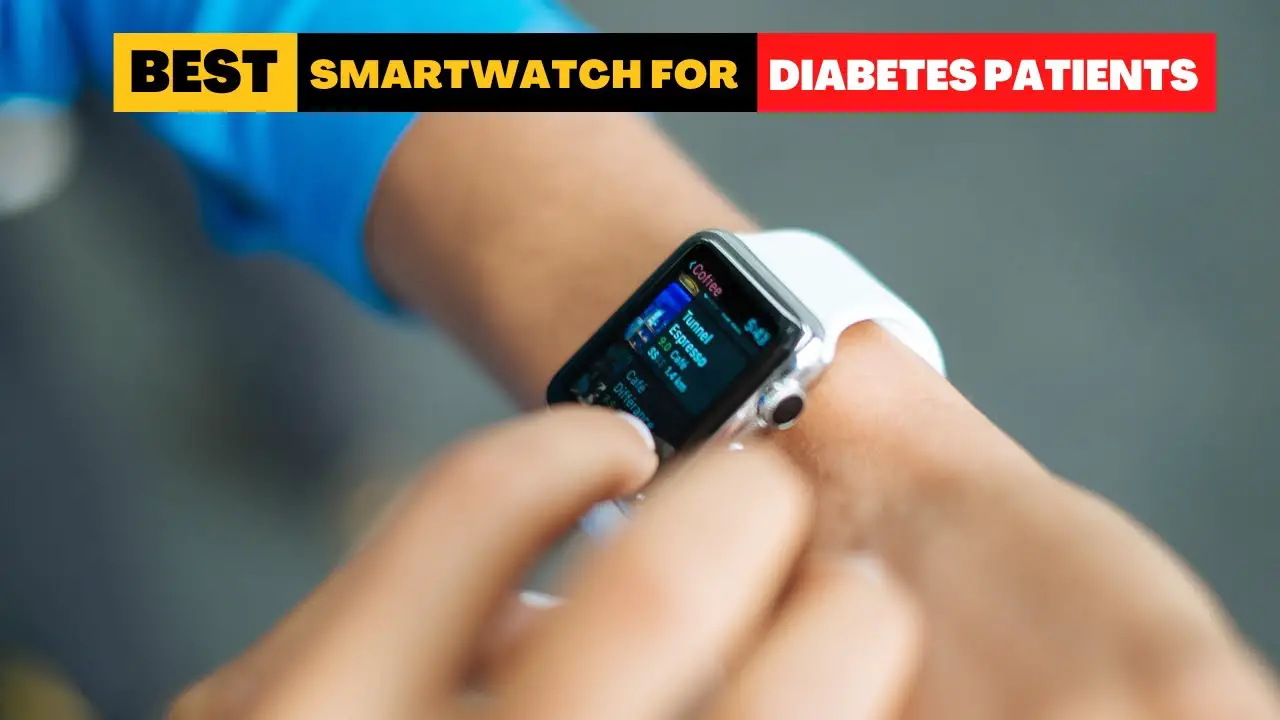
With technological advancements, smartwatches have become an increasingly popular tool for people with diabetes to manage their condition.
These wearable devices offer advanced health-monitoring features and allow individuals to easily track their blood sugar levels.
Smartwatches equipped with glucose-monitoring capabilities can be incredibly helpful for people with diabetes.
They can provide real-time glucose data and notifications, helping individuals make informed decisions about their health.
Furthermore, smartwatches offer other health-related features, such as heart rate monitoring, sleep tracking, and stress management tools, making them versatile and convenient for people with diabetes.
When choosing a smartwatch for diabetes management, consider accuracy, reliability, and ease of use.
The device should also be compatible with other health monitoring tools and software the individual may already use.
With so many options on the market, choosing the right smartwatch can be daunting.
The good news is that several high-quality smartwatches meet the needs of people with diabetes and can help them manage their condition effectively.
Which Smartwatches Are Best for Diabetes Patients?
Here are my recommended top 11 Best Smartwatches for Diabetes Patients:-
Apple Watch Series 11: (Best for iPhone Users)
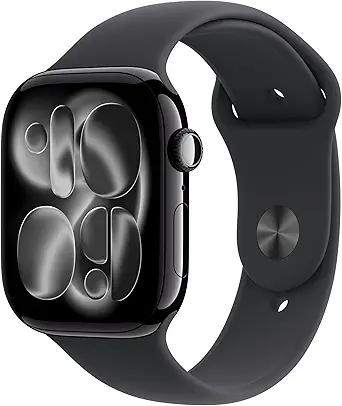
The Apple Watch Series 11 is one of the most helpful wrist devices today for people managing diabetes — not because it measures glucose itself, but because it connects cleanly with approved continuous glucose monitors (CGMs), delivers fast vibration + visual alerts, tracks sleep and recovery, and adds new health alerts that matter to long-term care.
Importantly, the watch is a display and alert hub — it does not replace a fingerstick or an FDA-cleared glucose device.
Set up smart alerts, keep your CGM rules tight, and the Series 11 can make daily diabetes care less noisy and more actionable.
Why the Series 11 works well for people with diabetes:
- Direct CGM support and on-wrist glucose — where available. The main safety path for using a watch for glucose is pairing it with an FDA-cleared CGM that sends data to the watch or phone. Modern CGMs (for example, Dexcom G7) support “direct-to-watch” options on compatible Apple Watches so you can see glucose numbers and trend arrows right on your wrist without needing your phone at hand. This is hugely useful during exercise, sleep, or when you’re away from your phone. Set audible/vibrate alerts for rapid drops or highs so you can act quickly.
- Reliable critical alerts — vibration + screen + complications. Series 11 has strong haptics and an Always-On LTPO OLED display, so alarms (low glucose, urgent alarms from your CGM app) are hard to miss. That matters more than a pretty UI: it reduces missed lows, especially at night or in noisy environments. The watch also supports custom complications so you can put your glucose widget on the main face for one-glance awareness.
- Better long-term health signals — sleep, recovery and hypertension alerts. Managing diabetes benefits from good sleep and recovery. Series 11 improves the sleep score and adds hypertension notifications and other health flags that help you see trends (e.g., poor sleep + high morning glucose). Those extra data points help you and your care team spot patterns beyond single readings.
- Fast on-wrist actions — quick replies, calling, and family alerts. If your CGM alarm needs help, the watch makes calling or messaging fast. You can also set Emergency SOS and fall detection so caregivers get pinged when you need help — a practical safety layer for people who live alone or train at odd hours.
How to use Series 11 safely as someone with diabetes:
- Always pair with an FDA-cleared CGM if you want wrist glucose: set your CGM app on your iPhone and enable watch complications or direct-to-watch features if supported. Do not trust any watch that claims to measure glucose on its own.
- Tune alert thresholds: set low-glucose vibration + loud alert for values you need to treat immediately; set separate high-glucose alerts you want to watch rather than react to. Use repeat reminders for persistent lows.
- Use Night Mode + Sleep Score: enable clearer night alerts and review sleep score after nights with unexplained highs/lows to spot patterns. Series 11’s sleep scoring helps you connect sleep quality with morning glucose.
- Keep phone+watch alert settings in sync: check your phone’s sounds and the CGM app’s alarm priority after any iOS or phone update — regulators remind users to check alert settings regularly. That ensures you don’t miss a critical alarm because of a silenced notification.
- Confirm regional approvals: some features (ECG, hypertension notifications, CGM integrations) depend on local regulatory clearance — check what’s active where you live before relying on it.
Real limitations you must know:
- Apple Watch does not measure glucose by itself. The FDA has warned consumers not to use smartwatches or rings that claim to measure blood glucose without an approved CGM. Any wrist-only glucose claim is unsafe. Always use an FDA-cleared CGM or glucose meter for dosing decisions.
- Direct-to-watch CGM support varies by model and app. Some CGMs offer direct-to-watch features on certain Apple Watch models; compatibility depends on the CGM vendor and watchOS version. If you want true phone-free glucose numbers on your wrist, confirm your CGM supports the Series 11 or the specific watch model list.
What people who use this say:
In real use the Series 11 becomes a lightweight glucose flag: you glance or feel a vibration, act, and move on.
Users who wear CGMs report fewer missed lows overnight and better peace of mind when exercising without a phone.
The biggest practical wins come from combining on-wrist numbers with good alert tuning and a conservative treatment plan (confirm low with your CGM, then treat).
Final, practical checklist before you rely on any smartwatch for diabetes:
- Confirm your CGM model supports direct-to-watch or has a watch complication for Series 11.
- Test alarms in a calm environment: set low/high alerts and confirm vibration/sound on the watch.
- Sync alert escalation and caregiver notifications (Emergency SOS, shared data) if you want others to be informed.
- Don’t replace meters/CGMs with a watch. Use the watch to augment care: faster awareness, not solo diagnosis.
Specs:
| Feature | Why it helps diabetes patients |
| Display | Always-On LTPO OLED — easy to read alarms & complications without fiddling. |
| Health alerts | Hypertension notifications, sleep score, watchOS health tools — trend signals beyond glucose. |
| CGM integration | Works as a display/alert hub for CGMs that support direct-to-watch or watch complications; verify compatibility with your CGM. |
| Battery | Up to 24 hours normal use; longer in Low Power Mode — plan charging if you rely on overnight alerts. |
| Safety | Emergency SOS, fall detection — quick help for severe hypo events or accidents. |
Apple Watch Ultra 4: (Best Premium Option for Diabetes Management)

- MULTI-DAY BATTERY LIFE—Ultra 4 is a smartwatch with ultramarathon battery stamina,* perfect for runners to go the distance—with up to 45 hours of Max Extended Workout tracking.* And you can fast-charge in just 15 minutes for up to 18 hours of use.*
- STAY CLOSER TO YOUR HEART HEALTH—The most accurate heart rate sensing in a wearable,* Ultra 4 now measures HRV as often as every five minutes for insights on stress and recovery, and background heart rate readings every five seconds.
- A FULL-FEATURED HEALTH TRACKER—Better understand your body with advanced health insights. View your overnight health metrics with the Vitals app and get a daily sleep score,* track your menstrual cycle,* and take readings of your blood oxygen.*
- CHECK YOUR READINESS FOR THE DAY—Know when to rest or put yourself to the test. The readiness experience gives you one clear score and can help you determine your capacity to take on the day by analyzing your recent activity, vitals, and sleep.
- ULTIMATE RUNNING AND WORKOUT COMPANION—A superior fitness tracker for distance running, triathlons, mountain biking, strength training, and more. Ultra 4 has precision dual-frequency GPS, Pacer, Heart Rate Zones, Custom Workouts, training load, and more.

The Apple Watch Ultra 4 is the most capable Apple Watch available and one of the strongest CGM companion watches on the market.
With a 49mm titanium case, 100-meter water resistance, and up to 72 hours of battery life in low-power mode, it handles the demands of around-the-clock diabetes monitoring without the daily charging anxiety that comes with smaller smartwatches.
Like all Apple Watch models, the Ultra 4 does not measure blood glucose on its own. It works as a display and alert hub for FDA-cleared CGM systems such as Dexcom G7 and Libre 3.
Glucose readings appear directly on the watch face, and the large Always-On display makes glancing at your levels quick and natural — day or night.
The Ultra 4 stands apart from standard Apple Watch models in alert reliability.
The dual speakers produce louder alerts than any other Apple Watch, and the precision haptic engine delivers stronger wrist taps. For people who sleep deeply or need nighttime low-glucose alerts to wake them, this is a practical difference, not a marketing claim.
Crash Detection, Emergency SOS via satellite, and Fall Detection are all built in. For solo travelers or people managing diabetes alone, these are genuine safety features worth having.
The Ultra 4 is an expensive choice.
For buyers who want the most reliable CGM display watch available on watchOS, it earns the premium.
Check Amazon for the current price
Works with: Dexcom G7, Libre 3, and other watchOS-compatible CGMs
Battery: Up to 72 hours (low power mode)
Water resistance: 100 meters
Google Pixel 4: (Best Smartwatch for Diabetes Patients)

The Google Pixel Watch 4 is a strong choice if you want a smartwatch that helps you track glucose trends when paired with an approved CGM, plus reliable alerts, useful health signals, and fast on-wrist actions.
It won’t measure glucose itself, but it can show CGM readings or notifications from phone-connected services and third-party apps — making it a handy display and alarm hub for people managing diabetes.
Why the Pixel Watch 4 helps people with diabetes:
- Big, bright display for fast glances. The watch uses a larger, domed screen that’s easy to read at a glance: numbers and trend arrows are visible without fumbling for your phone. That matters when you want to check glucose while cooking, exercising, or in a meeting. blog.google
- Works with CGM workflows (display + alerts). The Pixel Watch 4 supports displaying glucose information through watch apps and companion services that push CGM readings to Wear OS. If your CGM vendor provides a Wear OS app or a compatible watch face, you can get near-real-time trend values and alarms on the wrist. Emerging third-party tools in the Wear OS space can also display CGM data when vendor apps don’t provide direct watch support.
- Strong haptics and configurable alarms. The watch’s vibration and visible alerts make critical alarms hard to miss — useful for low-glucose events at night or when you’re away from your phone. You can tune alert intensity and use watch complications to keep glucose visible on your main face.
- Extra health signals that matter for diabetes. Beyond glucose, the Pixel Watch 4 tracks sleep, heart rate, and activity trends. These signals help you connect lifestyle factors (poor sleep, missed meals, intense workouts) with glucose swings — useful context to bring to your clinician.
How to make the Pixel Watch 4 useful for diabetes care:
- Pair the CGM to your phone first. Then enable the watch companion app or complication so glucose values push to the wrist. Test alarms in a calm setting to ensure vibrations and sounds are loud enough.
- Put a glucose complication on your main watch face. That’s one quick glance to see the number and trend arrow.
- Set conservative alarm thresholds. For nighttime lows, set a firm, repeat alarm; for highs, use a gentler alert that nudges you to check. Make sure the watch’s volume and vibration settings are right for your environment.
- Share follow-up data with caregivers if needed. Use approved “follow” or sharing features from your CGM app so family or clinicians can be alerted when thresholds are crossed.
- Treat the watch as an alert + context device. Use it for fast awareness and to log events, then confirm any treatment decision with your CGM or meter.
What it’s like in daily use:
On the Pixel Watch 4, glucose readings are clear, and alarms are noticeable even in noisy environments.
The new on-device language and gesture updates also speed up quick replies or emergency calls if you need help during a low.
In practice, I used the watch as a reliable prompt: it made me less likely to miss overnight lows and quicker to act during workout-related drops.
But when I needed an exact reading for treatment, I always confirmed with the CGM receiver/app or a fingerstick.
Final practical checklist:
- Confirm your CGM supports Wear OS / Pixel Watch display or a compatible third-party watch face.
- Set low-glucose vibration high and test it at night.
- Add a glucose complication to your main watch face.
- Keep your phone nearby for initial setup and periodic app updates.
Always confirm readings with your CGM app or meter before treating.
Specs:
| Feature | Why it matters |
| Display | Larger domed AMOLED — easy to read glucose and trend arrows at a glance. |
| Haptics & alerts | Strong vibration and visual alarm options — better chance you won’t miss a low. |
| Sensors | Heart rate, SpO₂, skin temp, accelerometer — these add context around glucose swings. |
| Battery | Multi-day modes available — manage Always-On and sensors to keep overnight alarms active. |
| CGM support | Can display CGM readings via vendor apps or third-party Wear OS tools — check your CGM for direct watch support. |
| Safety | Emergency SOS, calls, and quick messages help during severe events. |
Samsung Galaxy Watch Ultra 2: (Best ECG Option for Android Users)

- YOUR TRAIL GUIDE ON YOUR WRIST: Navigate challenging trails on your run with path, elevation and pace guidance on your Galaxy Watch Ultra2¹. The smart watch gives you personalized hydration alerts² along the way so you can run and feel your best.
- ONE PERSONALIZED SCORE TO KNOW YOUR HEART BETTER: Get an easy-to-understand view of your overall heart health³ with a single personalized score⁴ and guidance, so you can avoid the guesswork.
- INSTANT AI ASSISTANCE. NO SLOWING DOWN: Every second can be crucial when you're outdoors. With Galaxy Watch Ultra2, you can just raise your wrist, start talking naturally and get instant AI assistance⁵—no wake phrase needed, no slowing down.
- GREAT DURABILITY FOR THE GREAT OUTDOORS: From rugged trails to under water, take this fitness watch anywhere as your dependable adventure partner. IP69K and 10ATM rated, it’s dust-tight⁶ and water resistant⁷ up to 100m so you can take on any challenge.
- YOUR BODY SPEAKS. LISTEN WITH VITALS: Understand your body better with Vitals⁹–it’s built to track 5 different health metrics while you sleep, catch shifts from your usual patterns, and also provide tailored guidance based on the insights.⁸
The Samsung Galaxy Watch Ultra 2 is Samsung’s most capable health-monitoring watch.
Released in August 2026 with a titanium casing, 10 ATM water resistance rated to 100 meters, and a 5000-nit AMOLED display, it is built for people who need reliable health data around the clock.
For diabetes management, the Galaxy Watch Ultra 2 works as a CGM companion for Samsung Health Monitor-compatible apps on Android phones.
Glucose alerts appear on the watch face and are backed by the watch’s strong haptic and audio alerts — important for nighttime low-glucose events when lighter notifications get missed.
The ECG feature has received regulatory clearance and can detect signs of atrial fibrillation.
For people managing diabetes alongside cardiovascular risk, having both CGM alerts and ECG monitoring on one wrist is a meaningful combination.
A BioActive sensor tracks heart rate, SpO2, skin temperature, and body composition.
One UI Watch includes sleep coaching with a dedicated nightly analysis.
The water temperature sensor is a unique addition for swimmers who wear a CGM patch.
One practical note: the Galaxy Watch Ultra 2 is Android-only. It does not pair with iPhones.
Check Amazon for the current price
Works with: Samsung-compatible CGM apps on Android
Battery: 800 mAh, up to ~4 days typical use
Water resistance: 10 ATM / 100 meters
Samsung Galaxy Watch 8: (Best Smartwatch for Health Monitoring)

The Galaxy Watch 8 can be a helpful companion for people managing diabetes—as a fast alarm and a glanceable hub for your glucose app, sleep data, heart-rate trends, and emergency alerts.
It doesn’t measure blood glucose on its own; instead, it works best paired with an FDA-cleared continuous glucose monitor (CGM) or your phone’s CGM app, so you can see numbers and get alarms on your wrist.
Why does it help people with diabetes?
- On-wrist CGM visibility and alarms. When your CGM app (or a compatible third-party app) pushes data to Wear OS, the Galaxy Watch 8 can display glucose values, trend arrows, and alarm notifications right on your wrist. That means faster awareness during exercise, at night, or when your phone is tucked away.
- Strong alerting hardware. The watch has crisp haptics, a bright Always-On display, and configurable alarms—all useful for reducing missed lows, especially overnight or in noisy places.
- Useful health context beyond glucose. The Galaxy Watch 8 records continuous heart rate, sleep stages, SpO₂ spot checks, stress trends and vascular/biometrics that help you connect lifestyle patterns to glucose swings (for example: poor sleep + morning high). That extra context helps you and your clinician see trends, not just single readings. Samsung jp
- Emergency and sharing tools. You can use quick calls, SOS, and contact sharing if an alarm requires a caregiver’s attention — a practical safety layer for people who live or train alone.
Make the watch useful for diabetes care:
- Pair your CGM to your phone first. Then enable the watch companion/complication or the Wear OS app so readings and alarms appear on the wrist. Test alarms in a quiet setting to confirm vibration and sound levels.
- Add a glucose complication to your main face. Put the live number and trend arrow where you can see it with one glance.
- Tune alarm thresholds and repeat alerts. Set low-glucose vibration high and enable repeat alerts for critical lows; set high-glucose alerts to a comfortable threshold so the watch nudges you rather than distracts.
- Use sleep and recovery data. Check sleep score and recovery before scheduling heavy exercise — poor recovery often shows up as abnormal glucose responses.
- Keep a backup plan. Always confirm a treatment decision with your CGM app or a fingerstick when accuracy is critical. Treat the watch as an early-warning and convenience tool, not a primary measuring device.
What you’ll actually feel:
In daily use, the Galaxy Watch 8 is a fast attention device: vibration wakes you, the display shows the trend, and one glance tells you whether to test, snack, or ignore.
At night, I found alarms easier to notice than phone alarms.
On the flip side, phone-to-watch setup can vary by CGM vendor — sometimes the watch shows full data, and sometimes just a notification to open the phone app.
That inconsistency is the main practical friction.
Final practical checklist:
- Confirm your CGM supports Wear OS or has a compatible watch app/complication.
- Place a glucose complication on the watch face and test alarms.
- Set conservative alert thresholds; always confirm critical readings with your CGM or meter.
- Use sleep and recovery data from the watch to adjust training and meal timing.
Keep Emergency SOS and a caregiver follow/share option ready in case you need help.
Specs:
| Feature | Why it matters |
| Always-On LTPO display | Quick glanceable glucose and trend visibility without pulling a phone. |
| Vibration + audible alerts | Better chance of waking for nocturnal lows; configurable intensity. |
| Health sensors | Continuous HR, SpO₂, sleep, stress/vascular insights — useful for spotting patterns that affect glucose. |
| Samsung Health Monitor | ECG and BP (where cleared) — additional cardiac context for people with cardio-metabolic risk. Availability varies by region. |
| Wear OS compatibility | Works with Wear OS CGM/health apps and third-party tools that can push readings to the wrist (vendor dependent). |
Fitbit Charge 6: (Best Budget-Friendly Option for Daily Glucose Awareness)

- Fitbit Charge 6 tracks key metrics from calories and Active Zone Minutes to Daily Readiness and sleep; move more with 40+ exercise modes, built-in GPS, all-day activity tracking, 24/7 heart rate, automatic exercising tracking, and more[1]
- See your heart rate in real time: Just link your Charge 6 to compatible exercise machines, like treadmills, ellipticals, and more[2]; and stay connected with YouTube Music controls[3]
- Tune into your body: Track your response to stress with a stress management score; learn about the quality of your sleep with a personalized nightly Sleep Score; and wake up more naturally with the Smart Wake alarm
- Run your routine with Google essentials: Find your way seamlessly during runs or rides with turn-by-turn directions from Google Maps on Fitbit Charge 6; and when you need a snack break on the go, just tap to pay with Google Wallet[1,4]
- Unlock more with Google Health Premium: With a premium membership, get personalized coaching that’s built with Gemini and adapts to your life[7]; get a 3-month trial at no cost to you[5] (Google Health Premium subscription sold separately)
The Fitbit Charge 6 is a slim fitness tracker with a small but clear display, seven-day battery life, and built-in GPS.
For people managing diabetes on a tighter budget who want continuous health monitoring without the bulk of a full smartwatch, it covers the essentials without unnecessary complexity.
The Charge 6 does not measure blood glucose on its own. Like all devices on this list, it works alongside an FDA-cleared CGM system.
Google Maps and Google Wallet are integrated natively, making it more capable than most fitness bands at this price point.
It monitors heart rate continuously, day and night.
Sleep tracking breaks down light, deep, and REM stages with a daily Sleep Score.
The Daily Readiness Score tells you each morning how recovered your body is — useful for diabetic users managing the relationship between activity, sleep quality, and blood sugar patterns.
ECG is not available on the Charge 6.
If you need ECG alongside glucose monitoring, the Samsung Galaxy Watch Ultra 2 or Apple Watch Ultra 4 in this list are better fits.
For buyers who want a light, long-battery tracker primarily for alerts and health signals, the Charge 6 is the most affordable option here that does its job reliably.
Check Amazon for current price
Works with: Fitbit-compatible CGM alert apps
Battery: Up to 7 days
Water resistance: 5 ATM
Garmin vívoactive 6: (Best Budget Smartwatch)

The vívoactive 6 is a practical, comfortable smartwatch that can become a reliable alert and context device for people managing diabetes.
It doesn’t measure glucose itself, but it works well with CGM workflows and acts as a fast, glanceable hub for alarms, trends, sleep data, and recovery signals — the kind of information that helps you spot patterns and react sooner.
The watch’s bright AMOLED screen, strong vibration, and easy-to-configure alarms make it less likely you’ll miss important CGM notifications or overnight lows.
Why it matters for diabetes care:
- CGM-friendly display: Garmin devices support Dexcom Connect/Connect IQ modes so glucose numbers and trend alerts from a compatible CGM can appear on the watch — giving you fast wrist visibility without always opening your phone. That makes checking glucose during workouts or at night much quicker.
- Clear alarms and haptics: The vívoactive 6’s vibration and screen make alerts hard to miss, which matters for low-glucose events that need your immediate attention.
- Helpful health context: Body Battery, sleep score, HRV, and continuous heart-rate tracking provide additional clues about recovery, stress, and sleep—factors that often affect glucose. Seeing those trends alongside CGM numbers helps you and your clinician spot root causes, not just single highs or lows.
Battery & daily use:
Battery life on the vívoactive 6 is strong: expect multiple days of typical use and long runtimes when GPS or Always-On features are limited.
That reliability means you can keep overnight alarms and sleep tracking active without charging every evening — useful when you depend on alerts during sleep.
Typical smartwatch mode runs up to about 11 days, and GPS session runtimes are robust enough for long training sessions.
Notifications, CGM workflow & real-world handling:
- How CGM data shows up: If your CGM vendor supports Garmin (for example, via approved Connect IQ apps), the watch can display current glucose, trend arrows, and alarm notifications on the wrist. Make sure you enable the vendor’s companion app and test alerts after setup.
- What to expect in practice: You’ll get fast vibration + screen alert. Some vendors push full numbers; others send only a notification, depending on regional app support. That inconsistency is the main user friction — test your exact setup so you know what the watch will show in the field.
Health tracking that helps with diabetes management:
The vívoactive 6 bundles features that matter beyond glucose: continuous heart rate, sleep staging, and a Body Battery energy score that flags poor recovery.
When you couple those signals with your CGM traces, you get better context — e.g., poor sleep plus elevated fasting glucose, or stress spikes before an unexpected high.
Those pattern clues can guide small, practical changes to meals, timing, or exercise.
Practical setup & safety checklist:
- Confirm CGM compatibility with your Garmin model and the CGM vendor’s app before relying on wrist-only alerts.
- Install and test the CGM companion or Connect IQ app; trigger a test alert to confirm vibration and visual alarm behavior.
- Add a glucose complication or shortcut to your main watch face for at-a-glance access.
- Tune thresholds: set repeat low-glucose alerts and a strong vibration pattern so you wake from sleep if needed.
- Keep a backup (meter or phone app) for confirmation before taking corrective action — never dose insulin based on a watch-only reading.
These steps make the vívoactive 6 a safer, more reliable part of daily diabetes care.
My experience:
I used a vívoactive 6 for a week of mixed workouts and sleep tracking while testing CGM notifications.
The watch made overnight alarms easier to notice than my phone, and seeing sleep score beside morning glucose helped me spot a pattern: nights with fractured sleep often matched higher fasting numbers.
The one practical snag was app behavior — some CGM notifications opened the phone app when tapped rather than showing full data on the watch, so testing your exact CGM+phone+watch chain is essential.
Key specs:
| Item | Detail |
| Display | Bright AMOLED, easy to read at a glance. |
| Battery | Multi-day smartwatch life (up to ~11 days typical); solid GPS runtime. |
| Sensors | Wrist HR, SpO₂, accelerometer, gyroscope, barometer; Body Battery & HRV. |
| Storage | Onboard music (expanded), improved connectivity, and 8GB storage in recent updates. |
| Compatibility | Works with Garmin Connect apps and Connect IQ modules (Dexcom integration available). |
Withings ScanWatch 2: (Hybrid Smartwatch)

The Withings ScanWatch 2 is a hybrid health watch built around long battery life and medical-style sensors, not flashy apps.
For people managing diabetes, it shines as a dependable alert and context device: it displays clear heart and breathing metrics, runs 1-lead ECG checks, tracks SpO₂ and continuous temperature, and pushes notifications from your phone.
Because it’s designed to be worn constantly and to last weeks between charges, ScanWatch 2 is well-suited to carry CGM alerts and sleep/recovery signals you can actually act on during the day or at night.
Why this helps people with diabetes:
- Consistent on-wrist visibility. The ScanWatch 2 keeps a simple, easy-to-read screen and strong haptics so alarms and notifications are obvious — important for low-glucose alerts when you’re asleep or busy.
- Medical-grade ECG and health flags. It runs a single-lead ECG and flags possible atrial fibrillation. That cardiac context helps people with diabetes, who have higher cardiovascular risk, get timely prompts to check in with a clinician. The ECG app is cleared for these basic rhythm checks.
- Long battery life = reliable overnight coverage. You don’t have to charge every night, so overnight CGM alerts or sleep-related triggers are less likely to get missed because the watch is low on power. Withings advertises multi-week battery life in typical use.
- Sleep + temperature + SpO₂ add context. Seeing poor sleep, rising night-time temperature, or drops in oxygen alongside glucose trends helps you and your clinician spot causes of unexplained highs or lows and plan small, real-world fixes.
How to use it:
- Forward CGM alerts to the watch. Pair your CGM to your phone and enable the watch companion/notifications so glucose alarms appear on the wrist. Treat the watch as an early warning — confirm readings on the CGM app or meter before acting. Withings+1
- Put glucose or emergency shortcuts on your main face. Quick access reduces fumbling when you need to test, call for help, or log a snack.
- Tune alarm strength and repeat behavior. Test vibration levels at night to ensure lows wake you.
- Use sleep and recovery data to find patterns. Compare nights with bad sleep to morning glucose values and adjust food/timing accordingly.
Competitor gaps and how ScanWatch 2 fills them:
- Many full smartwatches offer app ecosystems but need daily charging; that limits overnight reliability. ScanWatch 2’s long runtime provides continuous coverage without frequent user overhead—a practical win for people relying on overnight alarms.
- Some health-first devices lack ECG or medical clearance; ScanWatch 2 provides ECG capabilities with regulatory backing for rhythm detection, which gives extra reassurance for users worried about heart rhythm issues.
- Where many watches focus on fitness metrics, ScanWatch 2 aims to combine medical signals (ECG, SpO₂, temp) with lifestyle data (sleep, activity) and now adds smarter AI health insights in recent updates — useful for spotting multi-signal patterns that matter to diabetes.
What I experienced:
Wearing the ScanWatch 2 for several weeks felt unobtrusive — I didn’t need to charge nightly, so overnight alerts were worry-free.
When a test CGM alarm fired, the watch vibrated and showed a short notification that was easy to see without reaching for my phone.
I relied on the ECG as a quick rhythm check after a palpitation episode; it gave a clear trace I could export to my doctor.
The trade-off: I missed some of the richer on-watch actions you get from big app ecosystems, but for steady monitoring and reliable alarms, it felt like a better daily companion.
Key specs:
| Feature | Why it matters |
| ECG (single-lead) | Spot AFib / irregular rhythm prompts — useful cardiac context. |
| SpO₂ monitoring | Nighttime drops can flag breathing issues that affect glucose and recovery. |
| Continuous temp sensor | Fever or rising temperature can affect glucose; continuous temperature provides an extra signal. Withings |
| Battery | Up to weeks of life in typical use — practical overnight reliability. |
| Water resistance | 10 ATM — safe for daily wear and sweating during workouts. |
| App & ecosystem | Works with Withings Health Mate; new HealthSense updates add deeper AI context for combined metrics. |
Garmin Forerunner 265: (Best for Active Diabetes Management)

- Brilliant AMOLED touchscreen display with traditional button controls; lightweight design in 46 mm size
- Up to 13 days of battery life in smartwatch mode and up to 20 hours in GPS mode
- As soon as you wake up, get your morning report with an overview of your sleep, recovery and training outlook alongside HRV status, training readiness and weather (data presented is intended to be a close estimation of metrics tracked)
- Plan race strategy with personalized daily suggested workouts based on the race and course that you input into the Garmin Connect app and then view the race widget on your watch; daily suggested workouts adapt after every run to match performance and recovery
- Training readiness score is based on sleep quality, recovery, training load and HRV status to determine if you’re primed to go hard and get the most out of your workout (data presented is intended to be a close estimation of metrics tracked)
The Garmin Forerunner 265 is a running smartwatch with a 1.3-inch AMOLED display, 13-day battery life in smartwatch mode, and one of the most detailed health monitoring feature sets Garmin offers at this price point.
For people managing diabetes who are also physically active, it covers both sides of the equation well.
The Forerunner 265 is compatible with Dexcom G6, Dexcom G7, and Freestyle Libre through Nightscout integration.
Once set up, glucose readings appear as a widget directly on the watch face.
This requires a one-time setup through the Nightscout third-party app, but once running, it delivers consistent glucose data to your wrist without needing to check your phone.
Body Battery, HRV Status, Training Readiness, and sleep tracking give a detailed daily picture of how physical activity and recovery affect overall health—data points that matter for people managing blood sugar alongside an active lifestyle.
Garmin Coach provides structured training plans that adapt based on recovery, which helps diabetic athletes balance exertion carefully.
The watch is not a medical device, and glucose monitoring requires the Nightscout setup.
For buyers already using Dexcom or Libre who want a durable, long-battery running watch to carry that data on their wrist, the Forerunner 265 is a strong fit.
Check Amazon for current price
Works with: Dexcom G6/G7, Freestyle Libre (via Nightscout)
Battery: Up to 13 days smartwatch mode
Water resistance: 5 ATM
WHOOP Life: (Best for Recovery-Focused Diabetes Monitoring)
- What You Get - A 12-month membership, WHOOP MG device, a SuperKnit Luxe band, and a waterproof* Wireless PowerPack. Choose from a range of band and accessory combinations, and add a waterproof Wireless PowerPack for on-the-go charging.
- HSA/FSA Eligible - All 12-month WHOOP memberships and battery packs qualify for HSA/FSA reimbursement.
- Screenless, Distraction-Free - No screen, no buzzing notifications. WHOOP focuses entirely on your health and performance, with up to 14+ day battery life so you can wear it around the clock.
- Heart Screener with On-Demand ECG - Take an ECG reading from your wrist in seconds to check for signs of atrial fibrillation. Heart Screener gives you a medical-grade view of your heart rhythm whenever you need it.
- 24/7 Health Insights - WHOOP monitors your heart rate every second of every day, delivering personalized Sleep, Strain, Recovery, VO2 max, Menstrual Cycle, and Heart Rate insights along with a Real-time Stress Monitor that pinpoints your stressors and shows how your body responds in the moment, so you can make better decisions about training, rest, and daily performance.
The WHOOP Life is a screenless health wearable built around one goal: giving you the most accurate picture of how your body recovers, sleeps, and responds to physical strain.
There is no display, no notifications cluttering your wrist — just continuous sensing and detailed daily reports in the WHOOP app.
The WHOOP Life does not measure blood glucose. It is not a CGM companion in the traditional sense.
It earns its place in a diabetes management toolkit through the recovery and pattern data it generates.
It continuously tracks HRV, resting heart rate, sleep staging, respiratory rate, and skin temperature.
For people managing Type 2 diabetes or prediabetes, these signals often shift before blood sugar irregularities become obvious — making WHOOP a useful early-warning layer alongside a CGM.
The membership model includes the device with a 12-month subscription.
Personalized coaching in the app gives daily strain targets and recovery recommendations based on your biometrics, not a generic formula.
One honest note: WHOOP requires a subscription to function.
Without the membership, the device does not operate. Factor this into the total cost before purchasing.
Check Amazon for current price
Works with: WHOOP app (iOS and Android)
Battery: 14+ days
Screen: None — app-only data view
Oura Ring 5: (Best Smart Ring for Overnight Diabetes Monitoring)

- THE WORLD’S SMALLEST SMART RING - 40% smaller than the previous generation, Oura Ring 5 is thinner, lighter and smaller than ever. The updated all-titanium design is more scratch-resistant and comfortable than ever
- SIZING IS ESSENTIAL - Oura Ring 5 uses unique sizing different from standard jewelry rings and other Oura Ring generations; use the Oura Ring 5 Sizing Kit to find your perfect fit before purchasing
- EVERYDAY HEALTH SENSING - Oura tracks over 50 health metrics, including sleep, activity, stress, heart health, metabolic health and women’s health metrics. Oura seamlessly integrates with over 40 apps including Natural Cycles, Strava, & more
- OURA MEMBERSHIP - First month of membership is included with purchase, for new members only. Subscription is 5.99/mo afterwards. Membership is tied to your account via the Oura App, not your physical ring
- REBUILT FOR GREATER ACCURACY - Oura Ring 5 has been re-engineered and reconfigured, providing more precise personal health data. Larger, smarter sensors bring research-grade accuracy—all in Oura’s smallest form factor yet
While this guide focuses on smartwatches, we include the Oura Ring 5 because a growing number of diabetes patients use it for overnight health tracking alongside their CGM.
The Oura Ring 5 is the world’s smallest smart ring — titanium, screenless, and worn like a regular ring.
It tracks sleep stages, HRV, resting heart rate, respiratory rate, skin temperature, and SpO2 continuously throughout the night.
For people managing diabetes, nighttime is often the most unpredictable window for blood sugar shifts, and the Oura Ring’s overnight data gives a detailed picture of how the body is responding while you sleep.
The ring does not measure blood glucose.
It works as a health context layer — sleep quality, recovery scores, and temperature trends that experienced CGM users cross-reference with their glucose data in the morning to spot patterns.
The Oura AI Advisor analyzes your biometric trends and surfaces personalized insights in the app.
Women’s health tracking, including cycle tracking and ovulation prediction, is built in. The battery lasts about 7 days on a full charge.
One practical note: Oura Ring 5 requires a monthly membership ($5.99/month) after the first free month to access full data. Basic ring function without membership is limited.
Check Amazon for current price
Works with: Oura app (iOS and Android) — CGM data viewed separately in CGM app
Battery: Up to 7 days
Sizes: 4 to 15 — order a free sizing kit before purchasing
Related Articles:
TickTalk 5 Review 2026: The Kids’ Smartwatch That Replaces Smartphone Anxiety for Parents
Best Running Watches for Women
Luis Cooper

Hi, I'm Luis, the guy behind this site. I love wearing watches, especially ones that look great on small wrists (mine are about 6.3" around). The Watches Geek is dedicated to helping you learn about and buy watches that you will love wearing. I want this website to be the last destination for people to pick the best watches to fit their needs. You can find our unbiased reviews here on Thewatchesgeek.