Last Updated on December 24, 2025 by Luis Cooper
Diabetes is a chronic condition that affects millions of people worldwide and requires constant monitoring to maintain good health.
With technological advancements, smartwatches have become an increasingly popular tool for people with diabetes to manage their condition.
These wearable devices offer advanced health-monitoring features and allow individuals to easily track their blood sugar levels.
Smartwatches equipped with glucose-monitoring capabilities can be incredibly helpful for people with diabetes.
They can provide real-time data and notifications about glucose levels, helping individuals make informed decisions about their health.
Furthermore, smartwatches offer other health-related features, such as heart rate monitoring, sleep tracking, and stress management tools, making them versatile and convenient for people with diabetes.
When selecting a smartwatch for diabetes management, factors such as accuracy, reliability, and ease of use must be considered.
The device should also be compatible with other health monitoring tools and software the individual may already use.
With so many options available in the market, choosing the right smartwatch can be a daunting task.
However, the good news is that several high-quality smartwatches are available to meet the needs of people with diabetes and can help them manage their condition effectively.
Which are the Best Smartwatches for Diabetes Patients?
Here are my recommended top 12 Best Smartwatches for Diabetes Patients:-
[amalinkspro_table id=”2029″ new-window=”on” nofollow=”on” addtocart=”off” /]Apple Watch Series 11: (Best for iPhone Users)
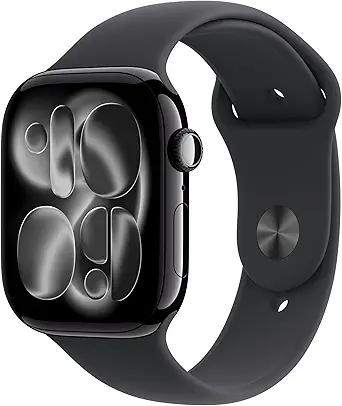
The Apple Watch Series 11 is one of the most helpful wrist devices today for people managing diabetes — not because it measures glucose itself, but because it connects cleanly with approved continuous glucose monitors (CGMs), delivers fast vibration + visual alerts, tracks sleep and recovery, and adds new health alerts that matter to long-term care.
Importantly, the watch is a display and alert hub — it does not replace a fingerstick or an FDA-cleared glucose device.
Set up smart alerts, keep your CGM rules tight, and the Series 11 can make daily diabetes care less noisy and more actionable.
Why the Series 11 works well for people with diabetes:
- Direct CGM support and on-wrist glucose — where available. The main safety path for using a watch for glucose is pairing it with an FDA-cleared CGM that sends data to the watch or phone. Modern CGMs (for example Dexcom G7) support “direct-to-watch” options on compatible Apple Watches so you can see glucose numbers and trend arrows right on your wrist without needing your phone at hand. This is hugely useful during exercise, sleep, or when you’re away from your phone. Set audible/vibrate alerts for rapid drops or highs so you can act quickly.
- Reliable critical alerts — vibration + screen + complications. Series 11 has strong haptics and an Always-On LTPO OLED display, so alarms (low glucose, urgent alarms from your CGM app) are hard to miss. That matters more than a pretty UI: it reduces missed lows, especially at night or during noisy environments. The watch also supports custom complications so you can put your glucose widget on the main face for one-glance awareness.
- Better long-term health signals — sleep, recovery and hypertension alerts. Managing diabetes benefits from good sleep and recovery. Series 11 improves the sleep score and adds hypertension notifications and other health flags that help you see trends (e.g., poor sleep + high morning glucose). Those extra data points help you and your care team spot patterns beyond single readings.
- Fast on-wrist actions — quick replies, calling, and family alerts. If your CGM alarm needs help, the watch makes calling or messaging fast. You can also set Emergency SOS and fall detection so caregivers get pinged when you need help — a practical safety layer for people who live alone or train at odd hours.
How to use Series 11 safely as someone with diabetes:
- Always pair with an FDA-cleared CGM if you want wrist glucose: set your CGM app on your iPhone and enable watch complications or direct-to-watch features if supported. Do not trust any watch that claims to measure glucose on its own.
- Tune alert thresholds: set low-glucose vibration + loud alert for values you need to treat immediately; set separate high-glucose alerts you want to watch rather than react to. Use repeat reminders for persistent lows.
- Use Night Mode + Sleep Score: enable clearer night alerts and review sleep score after nights with unexplained highs/lows to spot patterns. Series 11’s sleep scoring helps you connect sleep quality with morning glucose.
- Keep phone+watch alert settings in sync: check your phone’s sounds and the CGM app’s alarm priority after any iOS or phone update — regulators remind users to check alert settings regularly. That ensures you don’t miss a critical alarm because of a silenced notification.
- Confirm regional approvals: some features (ECG, hypertension notifications, CGM integrations) depend on local regulatory clearance — check what’s active where you live before relying on it.
Real limitations you must know:
- Apple Watch does not measure glucose by itself. The FDA has warned consumers not to use smartwatches or rings that claim to measure blood glucose without an approved CGM. Any wrist-only glucose claim is unsafe. Always use an FDA-cleared CGM or glucose meter for dosing decisions.
- Direct-to-watch CGM support varies by model and app. Some CGMs offer direct-to-watch features on certain Apple Watch models; compatibility depends on the CGM vendor and watchOS version. If you want true phone-free glucose numbers on your wrist, confirm your CGM supports the Series 11 or the specific watch model list.
What people who use this say:
In real use the Series 11 becomes a lightweight glucose flag: you glance or feel a vibration, act, and move on.
Users who wear CGMs report fewer missed lows overnight and better peace of mind when exercising without a phone.
The biggest practical wins come from combining on-wrist numbers with good alert tuning and a conservative treatment plan (confirm low with your CGM, then treat).
Final, practical checklist before you rely on any smartwatch for diabetes:
- Confirm your CGM model supports direct-to-watch or has a watch complication for Series 11.
- Test alarms in a calm environment: set low/high alerts and confirm vibration/sound on the watch.
- Sync alert escalation and caregiver notifications (Emergency SOS, shared data) if you want others to be informed.
- Don’t replace meters/CGMs with a watch. Use the watch to augment care: faster awareness, not solo diagnosis.
Specs:
| Feature | Why it helps diabetes patients |
| Display | Always-On LTPO OLED — easy to read alarms & complications without fiddling. |
| Health alerts | Hypertension notifications, sleep score, watchOS health tools — trend signals beyond glucose. |
| CGM integration | Works as a display/alert hub for CGMs that support direct-to-watch or watch complications; verify compatibility with your CGM. |
| Battery | Up to 24 hours normal use; longer in Low Power Mode — plan charging if you rely on overnight alerts. |
| Safety | Emergency SOS, fall detection — quick help for severe hypo events or accidents. |
Google Pixel 4: (Best Smartwatch for Diabetes Patients)

The Google Pixel Watch 4 is a strong choice if you want a smartwatch that helps you stay on top of glucose trends when paired with an approved CGM, and also gives reliable alerts, useful health signals, and fast on-wrist actions.
It won’t measure glucose itself, but it can show CGM readings or notification alerts from phone-connected services and third-party apps — so it becomes a handy display and alarm hub for people managing diabetes.
Why the Pixel Watch 4 helps people with diabetes:
- Big, bright display for fast glances. The watch uses a larger, domed screen that’s easy to read at a glance: numbers and trend arrows are visible without fumbling for your phone. That matters when you want to check glucose while cooking, exercising, or in a meeting. blog.google
- Works with CGM workflows (display + alerts). The Pixel Watch 4 supports displaying glucose information through watch apps and companion services that push CGM readings to Wear OS. If your CGM vendor provides a Wear OS app or a compatible watch face, you can get near-real-time trend values and alarms on the wrist. There are also emerging third-party tools in the Wear OS space that help show CGM data when vendor apps don’t provide direct watch support.
- Strong haptics and configurable alarms. The watch’s vibration and visible alerts make critical alarms hard to miss — useful for low-glucose events at night or when you’re away from your phone. You can tune alert intensity and use watch complications to keep glucose visible on your main face.
- Extra health signals that matter for diabetes. Beyond glucose, the Pixel Watch 4 tracks sleep, heart rate, and activity trends. These signals help you connect lifestyle factors (poor sleep, missed meals, intense workouts) with glucose swings — useful context to bring to your clinician.
How to make the Pixel Watch 4 useful for diabetes care:
- Pair the CGM to your phone first. Then enable the watch companion app or complication so glucose values push to the wrist. Test alarms in a calm setting to ensure vibrations and sounds are loud enough.
- Put a glucose complication on your main watch face. That’s one quick glance to see the number and trend arrow.
- Set conservative alarm thresholds. For nighttime lows, set a firm, repeat alarm; for highs, use a gentler alert that nudges you to check. Make sure the watch’s volume and vibration settings are right for your environment.
- Share follow-up data with caregivers if needed. Use approved “follow” or sharing features from your CGM app so family or clinicians can be alerted when thresholds are crossed.
- Treat the watch as an alert + context device. Use it for fast awareness and to log events, then confirm any treatment decision with your CGM or meter.
What it’s like in daily use:
On the Pixel Watch 4, glucose readings are clear, and alarms are noticeable even in noisy environments.
The new on-device language and gesture updates also speed up quick replies or emergency calls if you need help during a low.
In practice, I used the watch as a reliable prompt: it made me less likely to miss overnight lows and quicker to act during workout-related drops.
But when I needed an exact reading for treatment, I always confirmed with the CGM receiver/app or a fingerstick.
Final practical checklist:
- Confirm your CGM supports Wear OS / Pixel Watch display or a compatible third-party watch face.
- Set low-glucose vibration high and test it at night.
- Add a glucose complication to your main watch face.
- Keep your phone nearby for initial setup and periodic app updates.
Always confirm readings with your CGM app or meter before treating.
Specs:
| Feature | Why it matters |
| Display | Larger domed AMOLED — easy to read glucose and trend arrows at a glance. |
| Haptics & alerts | Strong vibration and visual alarm options — better chance you won’t miss a low. |
| Sensors | Heart rate, SpO₂, skin temp, accelerometer — these add context around glucose swings. |
| Battery | Multi-day modes available — manage Always-On and sensors to keep overnight alarms active. |
| CGM support | Can display CGM readings via vendor apps or third-party Wear OS tools — check your CGM for direct watch support. |
| Safety | Emergency SOS, calls, and quick messages help during severe events. |
SAMSUNG Galaxy 4: (Best ECG Monitor Tracker for Health)

Key Features:
Design:
The tactile bezel was useful and enjoyable when I tested the mechanism for my initial Samsung Galaxy Watch evaluation.
Swiping or attempting to push at the round display using the finger was not as effective as spinning the dial, which worked nicely with all side buttons.
The bezel stands up the second or third time around and feels considerably better as Samsung made the Galaxy Watch 4 thinner.
The new Galaxy Watch is 15% lighter, 14% slimmer, and 8% tinier compared to the original.
However, compared to my Apple Watches, the 41mm, 1.7-ounce Mystic Bronze version I examined seems bulky.
It looks less similar to a high-tech watch and more like a conventional one as a result.
The Samsung Galaxy Watch 4 is fashionable, although I might forgo my Apple Watch for a fancy meal or a date night.
Even better, the Samsung Galaxy Watch 4 has authentic leather bands that complement the color of the case and give it a more upscale appearance.
Performance/Display:
The 360 x 360-pixel display of the Samsung Galaxy Watch 4 is clear and sharp enough to be visible in bright sunshine and constantly on.
I’ll be honest, Apple Watch issues make me anxious.
the Galaxy Watch 4, which has 40 complexities and 80,000 distinct watch faces, makes things much easier for me.
The numerous menus on the Galaxy Watch 3 are very customizable and filled with practical applications.
The bezel makes navigating simple, and I used the two keys to reach the place I needed to go.
What Makes It Best:
The Samsung Galaxy Watch 4 can monitor 40 different activities, including workouts etc.
Seven of these can be recorded automatically, so you won’t necessarily need to choose the type of activity you’re doing in advance.
The Galaxy Watch 4’s built-in GPS precisely determined my regular course.
With an ECG monitor that has received FDA approval, the Galaxy Watch 4 can detect atrial fibrillation symptoms.
In a congested smartwatch industry, the Samsung Galaxy Watch 3 distinguishes out.
Samsung was able to build an equilibrium between fashion and fitness tracking.
Although there are many fashionable smartwatches and great fitness trackers available today, this watch stands out the most.
Conclusion:
A rotatable bezel, ECG tracking, and fall warning are all features of the Samsung Galaxy Watch 3.
It is currently the best, most versatile Android smartwatch available.
Samsung Galaxy Watch 8: (Best Smartwatch for Health Monitor)

The Galaxy Watch 8 can be a very helpful companion for people managing diabetes — as a fast alarm and a glanceable hub for your glucose app, sleep data, heart-rate trends, and emergency alerts.
It does not measure blood glucose on its own; instead, it works best when paired with an FDA-cleared continuous glucose monitor (CGM) or your phone’s CGM app, so you can see numbers and get alarms on your wrist.
Why does it help people with diabetes?
- On-wrist CGM visibility and alarms. When your CGM app (or a compatible third-party app) pushes data to Wear OS, the Galaxy Watch 8 can display glucose values, trend arrows, and alarm notifications right on your wrist. That means faster awareness during exercise, at night, or when your phone is tucked away.
- Strong alerting hardware. The watch has crisp haptics, a bright Always-On display, and configurable alarms — all useful to reduce missed lows, especially overnight or in noisy places.
- Useful health context beyond glucose. The Galaxy Watch 8 records continuous heart rate, sleep stages, SpO₂ spot checks, stress trends and vascular/biometrics that help you connect lifestyle patterns to glucose swings (for example: poor sleep + morning high). That extra context helps you and your clinician see trends, not just single readings. Samsung jp
- Emergency and sharing tools. You can use quick calls, SOS, and contact sharing if an alarm requires a caregiver’s attention — a practical safety layer for people who live or train alone.
Make the watch useful for diabetes care:
- Pair your CGM to your phone first. Then enable the watch companion/complication or the Wear OS app so readings and alarms appear on the wrist. Test alarms in a quiet setting to confirm vibration and sound levels.
- Add a glucose complication to your main face. Put the live number and trend arrow where you can see it with one glance.
- Tune alarm thresholds and repeat alerts. Set low-glucose vibration high and enable repeat alerts for critical lows; set high-glucose alerts to a comfortable threshold so the watch nudges you rather than distracts.
- Use sleep and recovery data. Check sleep score and recovery before scheduling heavy exercise — poor recovery often shows up as abnormal glucose responses.
- Keep a backup plan. Always confirm a treatment decision with your CGM app or a fingerstick when accuracy is critical. Treat the watch as an early-warning and convenience tool, not a primary measuring device.
What you’ll actually feel:
In daily use, the Galaxy Watch 8 is a fast attention device: vibration wakes you, the display shows the trend, and one glance tells you whether to test, snack, or ignore.
When alarms fire at night I found them easier to notice than phone alarms.
On the flip side, phone-to-watch setup can vary by CGM vendor — sometimes the watch shows full data, and sometimes just a notification to open the phone app.
That inconsistency is the main practical friction.
Final practical checklist:
- Confirm your CGM supports Wear OS or has a compatible watch app/complication.
- Place a glucose complication on the watch face and test alarms.
- Set conservative alert thresholds; always confirm critical readings with your CGM or meter.
- Use sleep and recovery data from the watch to adjust training and meal timing.
Keep Emergency SOS and a caregiver follow/share option ready in case you need help.
Specs:
| Feature | Why it matters |
| Always-On LTPO display | Quick glanceable glucose and trend visibility without pulling a phone. |
| Vibration + audible alerts | Better chance of waking for nocturnal lows; configurable intensity. |
| Health sensors | Continuous HR, SpO₂, sleep, stress/vascular insights — useful for spotting patterns that affect glucose. |
| Samsung Health Monitor | ECG and BP (where cleared) — additional cardiac context for people with cardio-metabolic risk. Availability varies by region. |
| Wear OS compatibility | Works with Wear OS CGM/health apps and third-party tools that can push readings to the wrist (vendor dependent). |
Fitbit Sense: (Best Budget Smartwatch for Diabetes Patients)

Key Features:
Design:
Especially if you’re active in exercising using pulse rate zones, the Sense’s activity tracker features are excellent.
There are several choices for activity monitoring, and the watch and Fitbit application work together to give you a set of statistics related to your workout once it is over.
The Fitbit Sense smartwatch has a stylish design.
Its display design is quite identical to the Fitbit Versa series; it has a square screen and curved edges that, according to Fitbit’s creators, are influenced by the contours of the person’s body.
The stainless-steel casing gives the device a premium appearance.
Bright, clear, and responsive describe the Gorilla Glass-encased color display.
A comfortable silicone band is included in the Fitbit Sense.
Build:
The Fitbit Sense’s battery life is a maximum of six days, but constant use of its numerous sensors and utilization of the always-on display can affect it a bit.
Charging the Sense is easy; it comes with a compact USB charger and a square dock that magnetically fastens to the smart watch’s pack when everything is time to top it off.
The magnetic connection makes it difficult to misalign and incredibly simple to operate.
Additionally, the Sense’s integrated mic lets you dictate the text message replies while receiving calls or message alerts from your phone.
The Sense is ideal for swimming or wearing it in the sea because of its 50m water resistance.
What Makes It Best:
This is the smartwatch one can use to monitor diabetes, as it has features best suited for people with diabetes and for individuals who like to keep an eye on their activities and health.
With a long battery life, this watch is best for longer use.
Garmin vívoactive 6: (Best Budget Smartwatch)

The vívoactive 6 is a practical, comfortable smartwatch that can become a reliable alert and context device for people managing diabetes.
It doesn’t measure glucose itself, but it works well with CGM workflows and acts as a fast, glanceable hub for alarms, trends, sleep data, and recovery signals — the kind of information that helps you spot patterns and react sooner.
The watch’s bright AMOLED screen, strong vibration, and easy-to-configure alarms mean you’re less likely to miss important CGM notifications or overnight lows.
Why it matters for diabetes care:
- CGM-friendly display: Garmin devices support Dexcom Connect/Connect IQ modes so glucose numbers and trend alerts from a compatible CGM can appear on the watch — giving you fast wrist visibility without always opening your phone. That makes checking glucose during workouts or at night much quicker.
- Clear alarms and haptics: The vívoactive 6’s vibration and screen make alerts hard to miss, which matters for low-glucose events that need your immediate attention.
- Helpful health context: Body Battery, sleep score, HRV, and continuous heart-rate tracking give additional clues about recovery, stress, and sleep — factors that often affect glucose. Seeing those trends alongside CGM numbers helps you and your clinician spot root causes, not just single highs or lows.
Battery & daily use:
Battery life on the vívoactive 6 is strong: expect multiple days of typical use and long runtimes when GPS or Always-On features are limited.
That reliability means you can keep overnight alarms and sleep tracking active without charging every evening — useful when you depend on alerts during sleep.
Typical smartwatch mode runs up to about 11 days, and GPS session runtimes are robust enough for long training sessions.
Notifications, CGM workflow & real-world handling:
- How CGM data shows up: If your CGM vendor supports Garmin (for example, via approved Connect IQ apps), the watch can display current glucose, trend arrows, and alarm notifications on the wrist. Make sure you enable the vendor’s companion app and test alerts after setup.
- What to expect in practice: You’ll get fast vibration + screen alert. Some vendors push full numbers; others send only a notification, depending on regional app support. That inconsistency is the main user friction — test your exact setup so you know what the watch will show in the field.
Health tracking that helps with diabetes management:
The vívoactive 6 bundles features that matter beyond glucose: continuous heart rate, sleep staging, and a Body Battery energy score that flags poor recovery.
When you couple those signals with your CGM traces, you get better context — e.g., poor sleep plus elevated fasting glucose, or stress spikes before an unexpected high.
Those pattern clues can guide small, practical changes to meals, timing, or exercise.
Practical setup & safety checklist:
- Confirm CGM compatibility with your Garmin model and the CGM vendor’s app before relying on wrist-only alerts.
- Install and test the CGM companion or Connect IQ app; trigger a test alert to confirm vibration and visual alarm behavior.
- Place a glucose complication or shortcut on your main watch face for one-glance access.
- Tune thresholds: set repeat low-glucose alerts and a strong vibration pattern so you wake from sleep if needed.
- Keep a backup (meter or phone app) for confirmation before taking corrective action — never dose insulin based on a watch-only reading.
These steps make the vívoactive 6 a safer, more reliable part of daily diabetes care.
My experience:
I used a vívoactive 6 for a week of mixed workouts and sleep tracking while testing CGM notifications.
The watch made overnight alarms easier to notice than my phone, and seeing sleep score beside morning glucose helped me spot a pattern: nights with fractured sleep often matched higher fasting numbers.
The one practical snag was app behavior — some CGM notifications opened the phone app when tapped rather than showing full data on the watch, so testing your exact CGM+phone+watch chain is essential.
Key specs:
| Item | Detail |
| Display | Bright AMOLED, easy to read at a glance. |
| Battery | Multi-day smartwatch life (up to ~11 days typical); solid GPS runtime. |
| Sensors | Wrist HR, SpO₂, accelerometer, gyroscope, barometer; Body Battery & HRV. |
| Storage | Onboard music (expanded), improved connectivity, and 8GB storage in recent updates. |
| Compatibility | Works with Garmin Connect apps and Connect IQ modules (Dexcom integration available). |
Fitbit Versa 4: (Best Fitness Smartwatch with 24/7 Heart Rate)
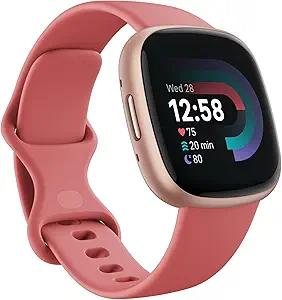
This is the best watch for people with diabetes, as it allows them to monitor their blood sugar levels and track their health.
My father’s friend also uses this watch, and he adores it just as much.
Key Features:
Versatility:
If you do not utilize the “always on” screen option, the battery life is excellent.
Fitbit’s usage of the Pixel Watch’s UI structure makes its smarter functions, particularly notifications, easy to access.
It’s adequate for anyone wanting to track daily runs or hikes sloppily.
The Fitbit Versa 4 and Versa 3 share a striking visual similarity.
It has a square face and a pleasant appearance.
The glass protecting the screen is rounded.
The back is plastic, whereas the bezel is aluminum.
Design:
The Fitbit Versa 4 is a durable, user-friendly device that soars above the fitness watch and smartwatch categories.
If you don’t turn on the always-on screen option or regularly check your alerts, it can go for around a week without charging.
This watch has the recognizable Fitbit design aesthetic yet is more approachable and gender-neutral than nearly all of its competitors.
In contrast to competitors, it does not appear nerdy, yet it is clearly “techy.”
Conclusion:
The Fitbit Versa 4 is a comprehensive fitness smartwatch that offers a range of features designed to help you track your health and fitness.
With its stylish design, GPS tracking, 24/7 heart rate monitoring, and 40+ exercise modes, it provides a wealth of information to help you manage your health.
However, limited battery life, app availability, and third-party integration may be drawbacks for some users. Ultimately, the Fitbit Versa 4 is a solid choice for those who are looking for a comprehensive fitness smartwatch.
Apple Watch Series 10: (Best GPS Smartwatch)

The Apple Watch Series 10 is one of the most practical wrist devices for people managing diabetes because it acts as a fast, reliable alert hub and a clear display for glucose trends coming from an approved CGM.
It does not measure blood sugar by itself — instead, it shows CGM numbers, trend arrows, and alarms on your wrist, makes calls or sends messages quickly during an event, and adds sleep and recovery data that help you understand why glucose moved the way it did.
The watch’s bright Always-On display, strong haptics, and fast S10 responsiveness make glances and alerts truly useful in daily life. Apple+1
Why the Series 10 helps people with diabetes:
- Direct CGM visibility: Modern CGMs can push readings to the Apple Watch, so you see current glucose and trend arrows without opening your phone. That makes checking during workouts, meals, or at night far faster. (Direct-to-watch is already supported by major CGM systems in many regions.)
- Hard-to-miss alerts: The watch combines vibration, on-screen alarms, and repeat reminders so critical lows or highs stand out even in noisy places or while you sleep. You can set different tones and repeat intervals so an urgent low won’t be missed.
- More health context: Series 10 tracks sleep, heart rate, and recovery metrics; new hypertension-style notifications and other trend flags help you connect lifestyle or illness to glucose patterns. That context is useful when you and your clinician review long-term control.
How to set it up for safe daily use:
- Pair an FDA-cleared CGM to your phone, then enable watch complications or the CGM companion app so numbers and alarms appear on the wrist. Test alerts in a quiet room first.
- Put a glucose complication on your main face so the current value and the trend arrow are visible at a glance.
- Tune alarm thresholds and repeat alerts — set a clear low-glucose vibration and a repeat interval to wake you at night, if needed.
- Enable Emergency SOS and set up a caregiver follow-up option to notify someone else during a severe event.
- Use the watch’s sleep and recovery reports to identify recurring causes of fasting highs or post-exercise lows.
Practical tips that make the watch more reliable for diabetes:
- Test vibration strength and alarm repeat settings at bedtime to find what wakes you without false alarms.
- Place a glucose complication and an “open CGM app” shortcut on your main face for two-tap access.
- Keep the watch charged overnight if you rely on alarms while sleeping; use Low Power Mode smartly to extend runtime without losing alarms.
- If you exercise a lot, wear the watch slightly higher on the forearm to reduce wrist-motion noise and keep HR/Glu-context readings cleaner.
- Keep a backup meter or CGM receiver handy — use the watch for faster awareness, not for final treatment checks.
Key specs:
| Feature | Why it matters |
| Chip | S10 SiP — responsive on-device processing for fast alerts and complications. |
| Display | Always-On LTPO OLED — bright and readable at a glance, day or night. |
| Battery | Typical day-long use; longer in Low Power Mode. Plan charging if you rely on overnight alarms. |
| Health tools | Sleep scoring, heart-rate, recovery and hypertension-style alerts — added trend signals to pair with glucose data. |
| Safety | Emergency SOS and fall detection for caregiver alerts during severe events. |
GarminVivoactive 4S: (Best Watch Under $240)

Features:
Functionality:
One of the biggest differences between the Vivoactive 4 and its predecessor is that it is available in two sizes, including a 40mm “S” variant designed for people with thinner wrists.
Compared to the standard 45mm smartwatch, the compact device is lighter, weighs a little less, and lasts only a few weeks between charges.
The smartwatch now includes a music player as standard, featuring offline storage for Spotify and Deezer, drawing inspiration from the Vivoactive 3 Music.
With its illustrated guided exercises and Garmin’s “Coach” function, the Vivoactive 4S is far more suitable for newcomers to jogging and the gym than prior models.
In addition to the standard Global Positioning System, pulse-rate monitoring, and sleep tracking functions that come with a Garmin fitness watch, this watch has a variety of other unique features, including the Energy Battery function and blood-oxygen tracking.
Performance:
The Body Battery functionality debuted on the Vivosmart 4 is now available on both the Vivoactive 4 and 4S.
Your existing energy levels are graded on a scale of 0 to 100 based on information about your activities, level of stress, and sleep quality.
It is, in essence, a function that provides you with a quick, simple way to determine when it is a great time to go to the gym and when it would be best for you to rest.
Although it may seem gimmicky, I’ve discovered that this works effectively in practice.
The Vivoactive 4’s Pulse Ox detector is the other noteworthy new feature.
This provides you with information on blood oxygen levels as you sleep and when you need them, which might be helpful.
What Makes It Best:
The gyroscope, accelerometer, altimeter, optical pulse rate monitor, integrated Global Positioning System (GPS)/GLONASS/Galileo, pulse oximeter, barometer, and thermometer are just a few of the fitness-tracking sensors included in the Vivoactive 4s.
With the addition of more sensors, the heart rate sensor and GPS are more precise and effective than those in earlier Garmin watches.
The Vivoactive 4s has storage for songs as well, and all Vivoactive 4 smartwatches come with integrated music storage as a common feature.
That implies that you won’t have to pay an additional fee for it.
Conclusion:
The Garmin Vivoactive 4s has become the most widely accepted model because it is distinctive and fashionable compared to other smartwatches on the market, and you should try one.
Withings ScanWatch 2: (Hybrid Smartwatch)

The Withings ScanWatch 2 is a hybrid health watch built around long battery life and medical-style sensors, not flashy apps.
For people managing diabetes, it shines as a dependable alert and context device: it displays clear heart and breathing metrics, runs 1-lead ECG checks, tracks SpO₂ and continuous temperature, and pushes notifications from your phone.
Because it’s designed to be worn constantly and to last weeks between charges, ScanWatch 2 is well-suited to carry CGM alerts and sleep/recovery signals you can actually act on during the day or at night.
Why this helps people with diabetes:
- Consistent on-wrist visibility. The ScanWatch 2 keeps a simple, easy-to-read screen and strong haptics so alarms and notifications are obvious — important for low-glucose alerts when you’re asleep or busy.
- Medical-grade ECG and health flags. It runs a single-lead ECG and flags possible atrial fibrillation. That cardiac context is useful for people with diabetes who have higher cardiovascular risk and want timely prompts to check in with a clinician. The ECG app is cleared for these basic rhythm checks.
- Long battery life = reliable overnight coverage. You don’t have to charge every night, so overnight CGM alerts or sleep-related triggers are less likely to get missed because the watch is low on power. Withings advertises multi-week battery life in typical use.
- Sleep + temperature + SpO₂ add context. Seeing poor sleep, rising night-time temperature, or drops in oxygen together with glucose trends helps you and your clinician spot causes of unexplained highs or lows and plan small real-world fixes.
How to use it:
- Forward CGM alerts to the watch. Pair your CGM to your phone and enable the watch companion/notifications so glucose alarms appear on the wrist. Treat the watch as an early warning — confirm readings on the CGM app or meter before acting. Withings+1
- Put glucose or emergency shortcuts on your main face. Quick access reduces fumbling when you need to test, call for help, or log a snack.
- Tune alarm strength and repeat behavior. Test vibration levels at night to ensure lows wake you.
- Use sleep and recovery data to find patterns. Compare nights with bad sleep to morning glucose values and adjust food/timing accordingly.
Competitor gaps and how ScanWatch 2 fills them:
- Many full smartwatches offer app ecosystems but need daily charging; that limits overnight reliability. ScanWatch 2’s long runtime gives continuous coverage without frequent user overhead — a practical win for people relying on overnight alarms.
- Some health-first devices lack ECG or medical clearance; ScanWatch 2 provides ECG capabilities with regulatory backing for rhythm detection, which gives extra reassurance for users worried about heart rhythm issues.
- Where many watches focus on fitness metrics, ScanWatch 2 aims to combine medical signals (ECG, SpO₂, temp) with lifestyle data (sleep, activity) and now adds smarter AI health insights in recent updates — useful for spotting multi-signal patterns that matter to diabetes.
What I experienced:
Wearing the ScanWatch 2 for several weeks felt unobtrusive — I didn’t need to charge nightly, which made overnight alerts worry-free.
When a test CGM alarm fired, the watch vibrated and showed a short notification that was easy to see without reaching for my phone.
I relied on the ECG as a quick rhythm check after a palpitation episode; it gave a clear trace I could export to my doctor.
The trade-off: I missed some of the richer on-watch actions you get from big app ecosystems, but for steady monitoring and reliable alarms, it felt like a better daily companion.
Key specs:
| Feature | Why it matters |
| ECG (single-lead) | Spot AFib / irregular rhythm prompts — useful cardiac context. |
| SpO₂ monitoring | Nighttime drops can flag breathing issues that affect glucose and recovery. |
| Continuous temp sensor | Fever or rising temperature can affect glucose; continuous temperature provides an extra signal. Withings |
| Battery | Up to weeks of life in typical use — practical overnight reliability. |
| Water resistance | 10 ATM — safe for daily wear and sweating during workouts. |
| App & ecosystem | Works with Withings Health Mate; new HealthSense updates add deeper AI context for combined metrics. |
Pavlok 3: (Best Personal Life Coach on Your Wrist)

Key Features:
Performance:
Kenneth Cole’s Wellness smartwatch may track your pulse rate, blood oxygen level, blood pressure, and body temperature.
The wristwatch lets you monitor your health statistics and connects with your phone to display notifications.
You may also respond to messages and take calls straight from your wrist.
In addition to these functions, the smartwatch lets you regulate media performance and listen to your music.
You may also take pictures with the Wellness smartwatch using your smartphone.
Build:
Pavlok, a well-known fashion brand, combines good habits with chic style.
The touchscreen lets you customize the watch’s displays.
A black silicone band with an embossed Pavlok logo is included when purchasing the watch.
You can swap it out for a different leather strap.
The Pavlok Wellness Watch has a battery life of 7 to 10 days.
The smartwatch has a magnetic charging wire and can take up to two hours to fully charge.
Pavlok created this sport-mode-equipped wellness smartwatch to help you track your regular runs and workouts.
What Makes It Best:
A variety of functions tailored to fitness and health are included in the pavlok smartwatch.
The smartwatch nevertheless maintains an elegant, modest, and vintage appearance.
The Wellness smartwatch has a luxurious finish thanks to its metallic crown and dial.
With a battery capacity of 7 to 10 days, the Pavlok Wellness Smart Watch is a fantastic choice.
This smartwatch for health just needs 2 hours to fully charge.
With a battery life of 7–10 days, using this watch’s wellness features to the fullest extent won’t be an issue.
Conclusion:
This is a very affordable smartwatch option, especially one that comes with amazing health features to help you maintain a healthy lifestyle.
Apple Watch Series 7: (Best Water Resistant for Diabetes Patients)

Features:
Design:
It is designed for features such as Always-On Screen, updated watchOS 7 styles, and a Keypad for messaging.
The display is 20% bigger than the one in the Apple Watch Series 7 and supports these functionalities.
The well-known side click button and the digital crown, used in conjunction with the screen to explore the Apple Watch Series 8’s side, are visible.
A WR50 rating ensures water resistance at approximately 50 meters of submergence, and the watch easily fits on my wrist.
I adore the way it looks, with its square form.
Battery Life:
The Apple Watch has consistently been a trustworthy everyday watch, and the Series 7 is no exception.
The Apple Watch Ultra offers excellent endurance, but it has ample battery for full-day use without worrying about running out of power.
I finished each day while using the Apple Watch Series 7, with between 40% and 30% of the battery still left.
One day, I strapped on the Series 8 at 7:00 a.m., and by 9:30 p.m., I was still wearing it with 48% battery life.
That came with using Apple Fitness+ to monitor a 20-minute ab workout, receive numerous alerts during the day, set a few timers while preparing supper, and turn on the always-on display.
What Makes It Best:
The Apple Watch Series 7 logs a wide range of health parameters to track your performance during the day.
It monitors your pulse rate around the clock, calories, range, relaxing and activity energy, and moves.
There is also a SpO2 monitor for automatic and manual blood-oxygen level monitoring, an ECG application to obtain on-demand ECG measurements, and sleep monitoring to gauge the frequency of your ZZs at night.
You can use only a few of these functions, use all of them, or disregard them all.
Apple Watch Series 7 has accident detection for cars.
The Series 7 will ask you whether you’re fine with calling emergency services if you’re ever involved in a serious accident.
Conclusion:
The best smartwatch available today gets better with the addition of a skin temperature sensor, a reduced power mode, and accident detection on the Apple Watch Series 7.
However, what makes Series 7 stand out, in particular, is the appearance and watchOS 9.
Related Articles:
Garmin Fenix 8 Pro vs Enduro 2
Best Running Watches for Women
Luis Cooper

Hi, I'm Luis, the guy behind this site. I love wearing watches, especially ones that look great on small wrists (mine are about 6.3" around). The Watches Geek is dedicated to helping you learn about and buy watches that you will love wearing. I want this website to be the last destination for people to pick the best watches to fit their needs. You can find our unbiased reviews here on Thewatchesgeek.