
Last Updated on April 12, 2026 by Luis Cooper
A software engineer who bought the Pixel Watch 3 in early 2025 described something that happened when the Pixel Watch 4 launched later that year.
He looked at the spec comparison, checked the price difference, and put his phone down.
His Watch 3 was doing everything he needed.
Sleep tracking was accurate.
Daily Readiness was reliable. GPS on his morning runs was clean.
The only thing the Watch 4 had that he genuinely wanted was faster charging.
Not enough to spend the difference.
That conversation captures exactly where the Pixel Watch 3 sits in 2026.
It is not the newest Google smartwatch.
But it is a genuinely capable device now available at a significantly lower price than when it launched, and for many Android users, it remains a practical and well-rounded choice.
This review covers what the Pixel Watch 3 does well, where it falls short, and most importantly, whether it makes more sense than buying the newer Watch 4 right now.
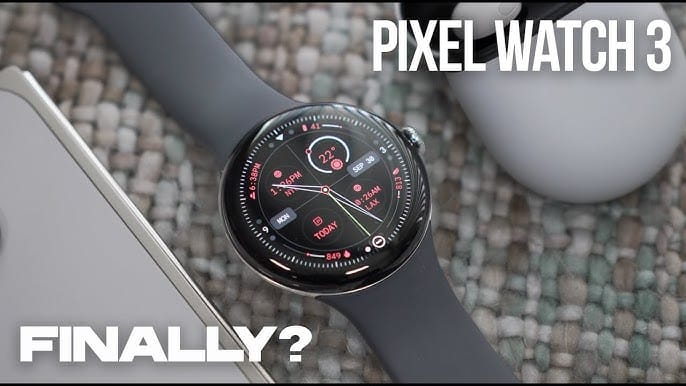
Google Pixel Watch 3 review

- The Google Pixel Watch 3 is designed for performance, with advanced fitness from Fitbit[1,2]; the 45mm screen is twice as bright and 40% larger than before, making it easier to see your stats and info[1]
- Maximize your performance with advanced running features; build custom run workouts and get real-time guidance and advanced form tracking[3]
- Enhance your run routine with Fitbit Premium; Google AI uses your goals, past runs, and readiness to power personalized run recommendations[3]
- Know what your body is ready for each day with readiness; it uses sleep, resting heart rate, and heart rate variability to show if you’re ready to take on a workout or prioritize recovery[3]
- Cardio load measures how hard your heart works so you can see how hard you’ve pushed; compare trends to see if you’re under- or over-training[3]
Design and Display:
The Pixel Watch 3 introduced the domed Actua display, which Google has carried over to the Watch 4.
The circular form with curved glass feels more like a piece of jewellery than most smartwatches.
Available in 41mm and 45mm, the 41mm suits smaller wrists, and the 45mm offers more screen real estate for workouts and maps.
Peak brightness on the Pixel Watch 3 reaches 2,000 nits.
Outdoor readability is good in most conditions. Direct midday sun requires a brief squint, which is where the Watch 4’s 3,000-nit display has a noticeable edge.
In everyday use indoors and during morning or evening exercise, the Watch 3 screen holds up well.
The bezels on the Watch 3 are slightly larger than the Watch 4, which reduced them by 15 percent.
If you put the two side by side, the difference is visible.
If you only ever wear the Watch 3, you never notice.
The domed glass and circular design still look modern and premium on the wrist in 2026.
Build quality is solid with Gorilla Glass 5 protection and IP68 plus 5ATM water resistance.
Daily wear, including gym sessions, rain, and swimming, is handled without any concern.
One thing worth knowing: the Watch 3 uses a magnetic puck charger on the rear.
If you lose or forget this cable, you cannot charge with any universal solution.
The Watch 4 changed this with a new side-mounted dock that is faster but equally proprietary.
Performance and Software:

The Pixel Watch 3 runs on the Snapdragon W5 Gen 1 processor, one generation behind the Watch 4’s W5 Gen 2.
In daily use, the difference is not dramatic. App switching is fast, notifications respond instantly, and navigation through Wear OS menus is smooth.
The Watch 3 has received the Wear OS 6 update, which brought Material 3 Expressive design, Gemini AI integration, and system-level battery improvements.
This means the Watch 3 is running the same software generation as the Watch 4. The interface looks the same. Gemini is on your wrist.
Google Maps, Google Wallet, and the Play Store all work identically.
What you do not get on the Watch 3 is Raise to Talk for Gemini, which requires the Watch 4’s newer hardware.
You can still access Gemini through the app, just not by lifting your wrist and speaking.
For most people, this is a minor distinction.
The Daily Experience: Living With the Pixel Watch 3:
The thing that most smartwatch reviews do not tell you is how the watch feels on the third week, not the third day.
The first few days with any new device carry a novelty factor that skews everything.
By week three, you know whether the watch is genuinely useful or whether it is something you wear out of obligation.
I wore the Pixel Watch 3 for several weeks through a mix of work days, weekend runs, gym sessions, and evenings at home.
What settled in over that period was a quiet appreciation for how unobtrusive it is.
Most smartwatches demand your attention.
Notifications pile up, fitness rings guilt you into activity, and charging rituals interrupt your day.
The Watch 3 does none of this aggressively. It sits on your wrist and does its job.
Notifications arrive with a subtle haptic tap that is firm enough to notice without startling you.
The haptic engine is one of the better ones on a smartwatch at this size.
Reading a message, dismissing a notification, or doing a quick reply from the watch takes seconds rather than requiring you to fish out your phone.
For anyone who spends time in meetings or situations where pulling out a phone is not appropriate, that wrist glance to check notifications becomes genuinely useful within days.
Google Maps navigation on the watch deserves a specific mention because it works better than most people expect.
Turn-by-turn directions arrive as haptic taps on your wrist.
A double buzz means turn right.
Three buzzes means turn left.
Once you learn the pattern, navigating an unfamiliar area without looking at your phone becomes natural.
I used this repeatedly during morning walks in new areas and found it more practical than any other navigation feature on a smartwatch I have used.
Google Wallet contactless payments work without the phone nearby.
You hold the watch near a payment terminal, authenticate with the side button, and the transaction processes.
The experience is faster than pulling out a card and nearly as fast as tapping a phone.
In everyday use, this sounds like a minor convenience, but it becomes one of those features you miss immediately when wearing a watch without it.
The Pixel Watch 3 works best when you are already in the Google ecosystem.
If your phone is a Pixel, your calendar runs through Google, your music is on YouTube Music or Spotify, and your smart home is on Google Home, the watch becomes an extension of everything else you use.
Nest Doorbell feeds appear on the watch screen.
Chromecast controls sit in a Tile. Calendar reminders show up with context rather than just a bare notification.
For non-Pixel Android users, the core functionality still works, but some deeper integrations are either less seamless or require a Pixel phone.
UWB phone unlock, which lets you unlock your phone just by holding the watch near it, requires a Pixel 7, 8, or 9 Pro.
The Pixel Recorder app only uploads recordings if you have a Pixel phone.
These are edge case features for most people, but worth knowing before you buy.
Auto-Bedtime Mode is one of those additions that sounds unnecessary until you use it consistently.
The watch detects when you have fallen asleep, automatically silences notifications, activates battery conservation, and restores your previous settings when it senses you have woken up.
It arrived as a software update in early 2025 and has since made the overnight wearing habit significantly easier to maintain.
Previously, the need to manually activate bedtime settings was why many people ended up skipping overnight sleep tracking entirely.
Gemini on the Watch 3 runs noticeably well, given the hardware age.
One long-term reviewer who wore both the Watch 3 and the Galaxy Watch 8 Classic side by side noted that Gemini on the Watch 3 responded just as quickly to queries and handled follow-up questions without missing context.
The hardware that runs the Watch 3 is old by smartwatch standards, but Google’s software optimisation has kept it performing smoothly well into 2026.
Health and Fitness Tracking:

The Pixel Watch 3 uses Fitbit’s health platform, which remains one of the most detailed consumer wellness systems available.
Sleep staging covers light, deep, and REM cycles, with sleep scores that most users find correlate well with how they actually feel in the morning.
Daily Readiness Score combines sleep quality, HRV, and recent activity into a morning number that guides whether to train hard or recover.
Cardio Load and Target Load track training strain over time, helping you understand cumulative fatigue across a week of workouts rather than evaluating each session in isolation.
These are the same features the Watch 4 carries forward.
The core health and fitness tracking experience between the two watches is largely identical for most users.
The one meaningful hardware difference is the body temperature sensor.
The Watch 4’s updated sensor delivers approximately 18 percent more accurate sleep stage tracking, according to Google’s own data. In practice, most reviewers found the Watch 3’s sleep staging reliable enough for everyday wellness decisions.
The gap matters more to people who use cycle tracking or monitor temperature deviation as a health signal than to those who use general fitness tracking.
GPS accuracy on the Watch 3 uses single-frequency positioning.
In open areas and parks, route tracking is accurate.
In dense urban environments near tall buildings or under heavy tree cover, occasional drift appears in the logs.
The Watch 4 added dual-frequency L1/L5 GPS, which reduces this significantly.
If you primarily run in cities with obstructed skies, this is the most practical hardware upgrade between the two models.
ECG is available on demand for rhythm checks and AFib screening.
SpO2 monitors blood oxygen passively and on demand. Irregular heart rhythm notifications run in the background without requiring manual checks.
These features work identically on the Watch 3 and the Watch 4.
The Wear OS App Ecosystem:
One of the most honest things to say about Wear OS in 2026 is that the app situation has improved considerably from where it was two years ago.
It is still not the Apple Watch’s App Store.
But for most people’s actual daily needs, it covers everything required without gaps.
Spotify works on the Watch 3. You can control playback, change playlists, and download songs directly to the watch for phone-free listening.
Strava, Nike Run Club, and most major fitness apps have dedicated Wear OS companions that sync automatically with the watch.
The Google Play Store on your wrist gives you access to a wide library of additional apps, from weather tools and calculators to meditation timers and camera remotes.
The tiles system is where daily interaction with the Watch 3 actually happens for most people.
Swipe left from the watch face, and you move through customisable tiles that surface the information you have chosen: current heart rate, today’s activity summary, next calendar event, weather, and sleep score from last night.
Setting up five or six tiles that reflect your actual daily habits takes about ten minutes and makes the watch genuinely informative without requiring you to open any app.
The watch face library is larger than most people realise.
Beyond the default faces Google ships, the Play Store carries numerous third-party faces ranging from minimal analogue designs to data-dense information displays that show weather, HRV, steps, and battery all at once.
Finding a face that matches how you want information presented on your wrist takes some time, but it is worth the effort.
The watch face you choose significantly affects how useful the Watch 3 feels day to day.
One limitation worth naming directly is the Wear OS keyboard. Tapping out messages on a small watch screen is uncomfortable and slow.
Voice replies work much better and are accurate enough for most short messages.
If you find yourself regularly writing more than a few words from the watch, a swipe keyboard app from the Play Store improves the experience, but it never matches the ease of just picking up your phone for anything longer than a quick acknowledgement.
Battery Life:
The Pixel Watch 3 in 41mm delivers approximately 24 hours of real-world use with an always-on display, active, continuous heart rate monitoring, and one GPS workout per day.
The 45mm model extends this to around 36-40 hours under similar usage.
For the 41mm, daily charging is effectively mandatory.
For the 45mm, charging every other day is achievable with careful use.
This means many 41mm users end up charging during their morning routine rather than overnight, which can create gaps in sleep-tracking data.
The Watch 4 improved this with 25 percent better battery efficiency and much faster charging.
The Watch 3 charges from zero to full in approximately 80 minutes.
The Watch 4 reaches 50 percent in 15 minutes.
If your overnight charging habits are inconsistent and you rely on quick top-ups, the Watch 4’s charging speed matters more than the capacity numbers suggest.
Pixel Watch 3 vs Pixel Watch 4: Should You Upgrade?

This is the question most people reading this review are actually asking. Here is an honest breakdown:
Choose the Pixel Watch 3 if:
You are buying on a budget and can find it at a significant discount. The core Fitbit health experience, Wear OS 6 software, and daily smartwatch functionality are identical. You run primarily in open areas where single-frequency GPS is sufficient. You are not bothered by the 80-minute full charge time.
Choose the Pixel Watch 4 if:
You run regularly in dense urban environments where dual-frequency GPS matters. You want the fastest possible charging for top-ups before heading out. Emergency Satellite SOS is a meaningful safety feature for your lifestyle. You want Loss of Pulse Detection as a passive safety layer. The 18 percent improvement in sleep stage accuracy from the updated temperature sensor is relevant to how you use health data.
If you already own a Pixel Watch 3, the upgrade is not compelling unless GPS accuracy during urban runs is genuinely frustrating you or faster charging would meaningfully change how you use the watch day to day.
For everything the Pixel Watch 4 offers beyond the Watch 3, the full breakdown is available in the detailed review at google-pixel-watch-4-review.
Who Should Not Buy the Pixel Watch 3:
If you use an iPhone, this watch does not pair with iOS at all.
If you run primarily in cities and GPS accuracy on every run matters to you, invest in the Watch 4 for the dual-frequency upgrade.
If overnight charging is difficult to maintain consistently and you want maximum battery with minimum friction, the Watch 4’s fast charging changes the daily experience in a way the Watch 3 cannot match.
And if Emergency Satellite SOS is a feature you want on your wrist, it’s not available on the Watch 3.
Specifications:
| Feature | Pixel Watch 3 (41mm) | Pixel Watch 3 (45mm) |
|---|---|---|
| Display | 1.2″ LTPO AMOLED, 2,000 nits | 1.4″ LTPO AMOLED, 2,000 nits |
| Processor | Snapdragon W5 Gen 1 | Snapdragon W5 Gen 1 |
| RAM / Storage | 2GB / 32GB | 2GB / 32GB |
| Battery Life | ~24 hours | ~36-40 hours |
| Charging | Full charge ~80 minutes | Full charge ~80 minutes |
| Water Resistance | 5ATM and IP68 | 5ATM and IP68 |
| GPS | Single-frequency GNSS | Single-frequency GNSS |
| OS | Wear OS 6 (updated) | Wear OS 6 (updated) |
| Health Features | Sleep staging, Daily Readiness, Cardio Load, ECG, SpO2, HRV | Same |
| Compatibility | Android only | Android only |
FAQs
What does the Pixel Watch 3 do?
Custom runs, real-time guidance, and performance insights to help you make progress and improve. Build custom runs. Create warmups, cooldowns, intervals, and pace and HR targets. Then, access saved workouts and track your PRs.
Is the Pixel Watch 3 waterproof?
The Pixel Watch 3 boasts a 5ATM water resistance rating. This rating means the watch can withstand water pressure equivalent to a depth of 50 meters, making it suitable for light swimming, showering, and other everyday water-related activities.
Can I track a Pixel watch?
The location of your Google Pixel Watch 2 is indicated with a watch symbol on the map. Choose Play sound. You will hear a sound when the phone finds your Google Pixel Watch 2. Press the crown to stop the sound on your Google Pixel Watch 2.
Related Articles:
Best Smartwatches for Calling And Texting
Samsung Galaxy Watch Ultra review
Best Affordable Rolex Alternative Watches
Luis Cooper

Hi, I'm Luis, the guy behind this site. I love wearing watches, especially ones that look great on small wrists (mine are about 6.3" around). The Watches Geek is dedicated to helping you learn about and buy watches that you will love wearing. I want this website to be the last destination for people to pick the best watches to fit their needs. You can find our unbiased reviews here on Thewatchesgeek.