
Last Updated on October 14, 2026 by Luis Cooper
Most parents researching kids’ smartwatches hit the same confusing wall.
The watch needs LTE to call home and track location.
LTE means a cellular plan.
A cellular plan means calling AT&T or T-Mobile and adding a new line to a family account.
That means talking to a carrier representative, understanding data plans, waiting for a SIM, and managing another line on the monthly bill — all before the watch makes a single call.
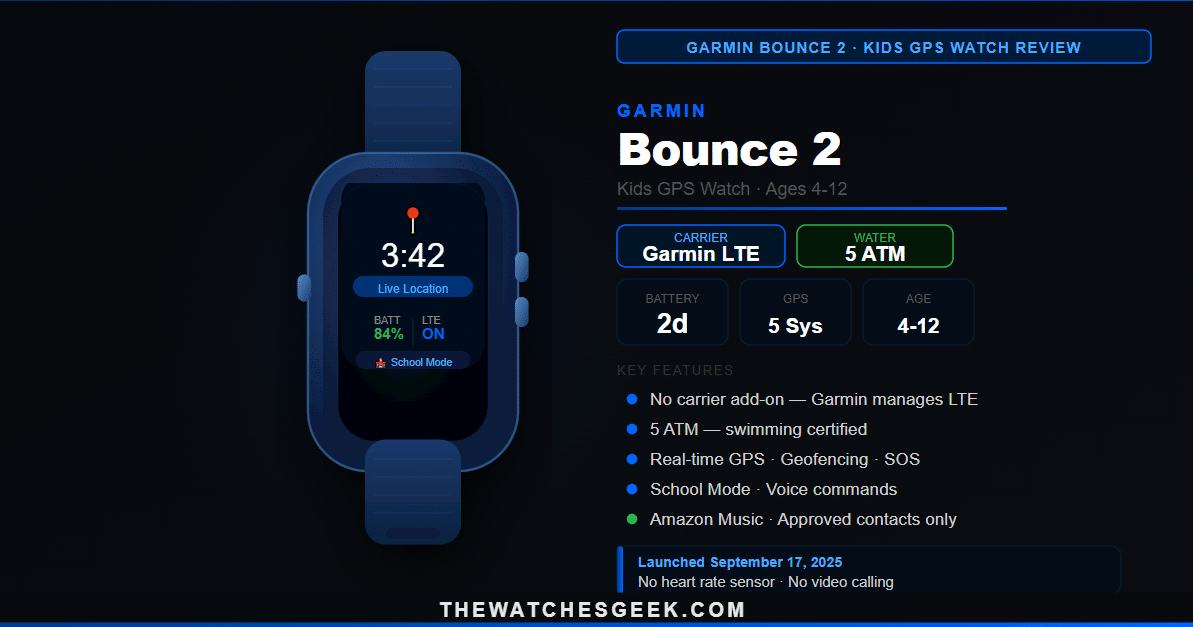
The Garmin Bounce 2, which launched on September 17, 2025, removes this wall entirely.
Garmin manages the cellular plan directly.
Parents pay Garmin, not their wireless carrier. No carrier call required, no new line added to an account, no SIM coordination.
The watch arrives, the Garmin Jr. app walks through setup, and the LTE connection is active within minutes of first wear.
For many families, this detail makes the decision.
A 10-year-old who attends weekly gymnastics classes described the watch to her parents as “the one that actually looks like a real watch.”
She had tried another kid’s watch before the Bounce 2 and stopped wearing it after two weeks because it looked like a party-bag toy.
She wore the Bounce 2 to her first gymnastics class, and it stayed on her wrist.
Her parents described the moment the geofencing notification arrived twenty minutes after class ended—when their daughter cycled to a friend’s house instead of coming home—as the first time a piece of technology delivered exactly what they needed without requiring them to do anything at all.
Garmin Bounce 2 Review



Quick Verdict
The Garmin Bounce 2 is the right watch for parents who prioritise accurate GPS tracking, swimming-safe durability, and LTE connectivity that works independently of a carrier account.
Garmin’s decade of GPS engineering experience shows in the location tracking, and the 5 ATM water resistance means the watch goes swimming when the child does.
It has real limitations that deserve equal weight.
With heavy daily LTE and GPS use, the battery lasts closer to one day than two, despite the official two-day rating.
It has no heart rate sensor—a feature some parents specifically want for activity tracking and health monitoring.
The GPS is single-frequency rather than dual-band, so accuracy in challenging signal environments is adequate rather than exceptional.
Whether those limitations matter depends on what a specific family most needs from a kids’ watch.
Design — What Children Actually Notice
The Garmin Bounce 2 has a round 43mm case made from fibre-reinforced polymer—a composite material that is lighter than metal, more impact-resistant than standard plastic, and far more durable than the casings on budget kids’ trackers.
The round face is deliberate: Garmin’s original Bounce used a square case, and feedback from families consistently noted that children responded better to a traditional round face that looks like an actual watch rather than a piece of tech strapped to the wrist.
The display is a 1.2-inch AMOLED panel.
AMOLED delivers bright, vivid colours with true-black backgrounds.
For children, this matters in practice — the icons, maps, and activity displays are clearer and more engaging on AMOLED than on the LCD screens used in most kids’ watches at comparable prices.
Voice commands, tap-to-call buttons, and the QWERTY keyboard for typing messages are all large enough for small fingers to use reliably.
Three colours are available: Slate Gray, Light Purple, and Turquoise.
The silicone strap is replaceable and sized for children’s wrists in the six- to eight-inch range.
The watch weighs 39.7 grams without the strap.
Most children who try it describe it as comfortable within the first day.
The Carrier-Independent Plan — Why This Matters
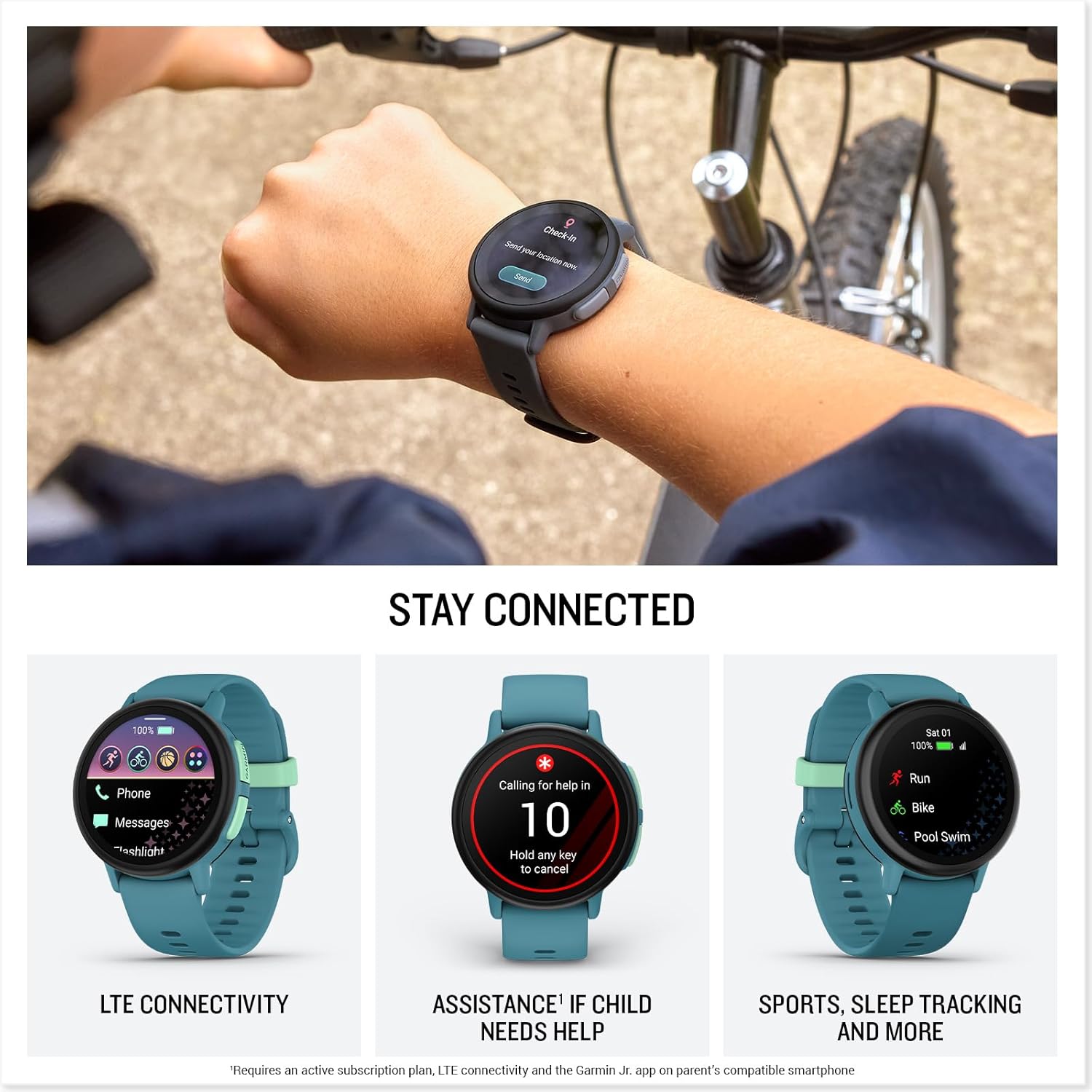
Most LTE kids’ watches require adding the watch as a device on a parent’s existing wireless plan.
This means the watch inherits the parent’s carrier — whichever network the parent already uses — and the monthly cost appears as an add-on line on that carrier’s bill.
The Garmin Bounce 2 works differently. Garmin operates its own managed LTE plan for the watch. Parents sign up through the Garmin Jr. app, pay Garmin directly, and the watch connects to available LTE networks without being tied to any specific carrier account.
A family using any wireless carrier can use the Bounce 2 on the same Garmin plan—there is no compatibility question about which carrier the watch requires.
The plan costs a fixed monthly or annual fee.
This covers calls, texts, and real-time GPS location data transmission between the watch and the parent app.
For families who have experienced the complexity of adding a child’s device to a carrier plan before — the wait for SIM activation, the confusion about data plan tiers, the contract questions — the simplicity of Garmin managing the cellular connection directly is a meaningfully different experience.
GPS Tracking — The Honest Picture
Most parents buy the Bounce 2 for GPS tracking, and Garmin’s navigation credentials are genuine.
The company has been building GPS hardware for professional and consumer use for decades, and that engineering depth shows in how the Bounce 2 handles location tracking compared to budget alternatives.
The Bounce 2 uses GPS, GLONASS, Galileo, BeiDou, and QZSS simultaneously — five satellite systems working together to produce the most accurate fix available from the satellite signals overhead at any given moment.
This multi-system approach produces reliable positioning in suburban neighbourhoods, school grounds, parks, and the typical environments where children spend most of their time.
Independent testing confirmed that the Bounce 2 is accurate enough to show which area of a school or schoolyard a child is in — useful real-world precision rather than a vague neighbourhood-level fix.
The GPS is always on.
You can’t switch it off between check-ins.
This continuous tracking is why the Bounce 2 delivers real-time, rather than periodic, location updates and why the battery drains faster than on fitness watches where GPS activates only during tracked workouts.
The honest limitation is that the Bounce 2 uses single-frequency GPS rather than dual-band.
Dual-band receivers process signals on two frequencies simultaneously, which helps filter out positioning errors that occur when signals bounce off walls, buildings, or terrain before reaching the receiver.
Single-frequency GPS performs well in open suburban environments and adequately in partially obstructed areas.
In rural environments with limited cell tower coverage, or in areas with complex signal environments like dense city centres, independent reviewers found GPS accuracy became more variable.
This is not a disqualifying limitation for most families — it reflects the current standard for GPS in consumer kids’ watches at this tier.
Communication Features
Two-Way Voice Calling
Children call parents and approved contacts by tapping the call button and selecting from the approved contact list, or by speaking a voice command — “call Mum” or “call Dad” — which triggers the call hands-free without needing to look at the watch.
Incoming calls from approved contacts vibrate and ring on the watch and can be answered with a screen tap.
No number outside the approved whitelist can reach the watch.
A child cannot receive calls from unknown numbers or dial any number a parent has not pre-approved in the Garmin Jr. app.

Text Messaging and Voice Messages
Text messages on the Bounce 2 are sent using a full QWERTY keyboard on the watch screen — not preset responses or emoji only, but actual typed messages that children of reading age can compose independently.
For children aged eight and above, this is a practical communication tool.
For younger children, voice messages offer an alternative: the child records a short audio message, and the parent receives both the audio file and an automatic text transcription in the Garmin Jr. app.
Parents describe voice message transcription as the most practical feature.
A parent in a meeting who cannot listen to an audio message can read the transcript immediately to understand whether the message needs an urgent response.
Voice Commands and Assistance
Voice commands allow children to interact with the watch hands-free.
Children can check the weather, set a timer, call a family contact, and play music through Amazon Music by speaking to the watch.
For a child cycling with the watch on the wrist, hands-free interaction is the only safe way to use the device mid-journey.
The assistance feature allows a child to trigger an emergency-style alert by pressing a dedicated button.
The alert sends the child’s live GPS location to all family contacts simultaneously and initiates a call to the primary parent contact.
This feature requires an area with data network coverage to function — it cannot be triggered in a dead zone.
Activity Tracking and Amazon Music
Built-in sports apps use GPS to track running, walking, cycling, and swimming activities.
For a child who wants to know how far they ran at football practice, how many laps they swam, or how long the cycle to school took, these apps record and display that data through the Garmin Jr. app alongside the daily step count.
One important clarification: the Bounce 2 does not have a heart rate sensor. Activity tracking covers distance, time, pace, and steps using GPS and the accelerometer, but it does not include heart rate or heart rate-based calorie estimates.
Parents who want heart rate monitoring as part of the watch’s health tracking won’t find it on the Bounce 2.
Amazon Music streaming through the 4GB internal storage lets children listen to music during activities or in the background all day.
Music drains the battery faster than passive watch use, and parents who want to manage this can restrict music access through the Garmin Jr. app.
The Garmin Jr. App — Parental Controls
The Garmin Jr. companion app for iOS and Android lets parents control every key aspect of the watch’s behaviour.
Real-time location appears on a map view that updates continuously while the watch has GPS signal and a data connection.
Geofences are defined as circles around specific locations — home, school, a grandparent’s address, a friend’s house, an after-school activity venue.
When the watch detects it has moved outside a defined zone, the parent app immediately sends a notification.
The parent can see the map and confirm the current location in the same notification.
Chore tracking and responsibility scheduling are features that distinguish the Garmin Jr. platform from basic safety apps.
Parents can assign chores through the app, the child marks them as completed on the watch, and parents receive confirmation.
Recurring responsibilities — homework, reading time, instrument practice — can be scheduled as daily or weekly reminders that appear on the watch face at the specified time.
The app manages the contact whitelist.
Adding, removing, and editing approved contacts takes seconds from the parent’s phone.
The app’s health section shows sleep data and step counts, along with any GPS activity records from the day.
Battery — The Reality vs the Rating
Garmin rates the Bounce 2 at up to two days of battery life.
Independent reviews paint a clearer picture.
TechRadar’s reviewer, testing with his ten-year-old son over several months, found that his son charged the watch most nights.
T3’s reviewer reported that the child’s first observation about the watch was that “the battery died quicker than other watches.”
Parent reviewers noted unexpected, rapid battery drain that could not be attributed to specific feature use.
The two-day rating assumes typical use — moderate calling, GPS tracking active, some messaging, no continuous music streaming.
Heavy use that includes frequent calling, extended music streaming, and active GPS sports tracking yields a much shorter result — independent testing estimates ten to fifteen hours under these conditions.
For most families whose children wear the watch to school and return home in the afternoon, the two-day rating comfortably covers a full school day and an after-school period.
The practical question is whether the charging habit — nightly for safety, or every other night — fits the family’s daily routine without becoming a friction point that causes the child to stop wearing the watch.
The charging cable is a proprietary Garmin connector rather than USB-C.
Multiple reviews criticised this because it adds another cable to manage and cannot be replaced with a standard universal cable. Keeping a spare cable at home and one in a bag is a practical precaution for families who travel.
5 ATM Water Resistance — The Advantage That Matters for Swimmers
The Bounce 2 is water-resistant to 5 ATM, meaning it is certified for swimming in pools and open water.
Children can wear it during swimming lessons, open-water activities, and any sustained water contact without needing to take precautions.
For families whose children swim as a sport or are regularly around water during outdoor activities, 5 ATM removes the friction of remembering to remove the watch before entering the water.
The TickTalk 5’s IP67 rating covers splashes and brief submersion to one metre but isn’t certified for swimming.
Garmin Bounce 2 vs TickTalk 5 — The Main Choice
The two most capable kids’ GPS watches currently available for US families are the Garmin Bounce 2 and the TickTalk 5.
They serve the same fundamental need—communication and location tracking for children who aren’t yet ready for a smartphone— but with different design priorities.
| Feature | Garmin Bounce 2 | TickTalk 5 |
|---|---|---|
| Water resistance | 5 ATM — swimming safe | IP67 — splash safe only |
| Video calling | No | Yes — HD |
| Camera | No | 5MP front |
| Heart rate sensor | No | No |
| GPS systems | 5 — always on | AI SmartPin (GPS + Wi-Fi + cellular) |
| Music | Amazon Music | iHeartRadio Family |
| Carrier | Garmin manages directly | AT&T or T-Mobile required |
| QWERTY keyboard | Yes | Yes |
| Chore tracking | Yes | Yes |
| App | Garmin Jr. (iOS + Android) | TickTalk app (iOS + Android |
The Bounce 2 is the better choice for families whose children swim, are active outdoors in mixed environments, and want to avoid adding a line to a carrier account.
The TickTalk 5 is better for families who want video calling and a front camera so grandparents and distant relatives can see the child during calls.
For a complete breakdown of the TickTalk 5’s communication features and AI SmartPin GPS, the full review at ticktalk-5-review covers every feature in detail. For a full comparison of kids’ watches across different age ranges and use cases, the comprehensive guide at best-watches-for-kids covers every current option.
Who should not buy this: Families who want video calling so grandparents or relatives can see the child during calls should choose the TickTalk 5 instead. Buyers who want a heart rate sensor as part of activity or health monitoring should look at watches that carry optical heart rate hardware — neither the Bounce 2 nor the TickTalk 5 include it. Families in areas with very limited cellular coverage should note that the always-on GPS and the assistance feature both require data connectivity to function reliably. For children above twelve who want more independence and a broader app ecosystem, watches designed for teenagers provide more appropriate functionality. The American Academy of Pediatrics provides evidence-based guidance on appropriate technology introduction for children at different developmental stages at aap.org.
Specifications
| Feature | Details |
|---|---|
| ASINs | B0FRGF5LP5 (Slate Gray) / B0FRG17Z9T (Turquoise) / B0FRG6MXMM (Light Purple) |
| Launch | September 17, 2025 |
| Case | 43mm round, fiber-reinforced polymer |
| Display | 1.2-inch AMOLED |
| Weight | 39.7 grams |
| Water resistance | 5 ATM — swimming certified |
| GPS | Multi-GNSS — GPS, GLONASS, Galileo, BeiDou, QZSS — always on |
| GPS type | Single-frequency |
| Battery rated | Up to 2 days |
| Battery heavy use | 10-15 hours |
| Storage | 4GB |
| LTE plan | Garmin managed — no carrier add-on needed |
| Heart rate | Not included |
| Communication | Voice calls, text, voice messages, QWERTY keyboard |
| Voice commands | Yes — hands-free calling, weather, timer |
| Assistance feature | Yes — location + call to family contacts |
| Music | Amazon Music |
| Activity tracking | Running, cycling, walking, swimming with GPS |
| Chore tracking | Yes — through Garmin Jr. app |
| Geofencing | Yes — multiple zones, real-time alerts |
| Parent app | Garmin Jr. — iOS and Android |
| Age range | 4-12 years |
FAQs
Does the Garmin Bounce 2 require a separate carrier plan?
No. The Garmin Bounce 2 uses a cellular plan managed directly by Garmin, separate from any parent carrier account. Parents sign up through the Garmin Jr. app and pay Garmin rather than a wireless carrier. The watch works regardless of the parent’s wireless carrier—AT&T, T-Mobile, Verizon, or any other—because it doesn’t rely on the parent’s carrier account for its LTE connection. The monthly plan covers calls, texts, and the real-time GPS location data that keeps the parent app updated. The annual plan option reduces the per-month cost compared to paying monthly.
Can the Garmin Bounce 2 be used for swimming?
Yes. The Bounce 2 is rated to 5 ATM, Garmin’s water resistance standard for swimming in pools and open water. Children can wear the watch during swimming lessons, recreational swimming, and open-water activities without needing to remove it. The watch’s GPS-tracked swimming app records session data while you’re in the water. The 5 ATM rating covers sustained submersion during normal swimming activity and is more protective than the IP67 rating, which covers only brief submersion to one metre.
What is the difference between the Garmin Bounce 2 and the original Garmin Bounce?
The Bounce 2 introduced several significant upgrades over the original 2022 Bounce. The display changed from a square LCD to a round 1.2-inch AMOLED, which is more vivid and better suited to the GPS map display and activity data views. GPS tracking became continuous and real-time in the Bounce 2, rather than the original’s periodic hourly background updates. Two-way voice calling was added — the original supported text and voice messages but not live phone calls. A full QWERTY keyboard for typed text messages replaced the preset-response system. Bounce 2 adds Amazon Music streaming and the assistance emergency feature. The trade-off is that the always-on GPS and LTE calling mean the Bounce 2 battery drains faster than the original, which had a more conservative always-connected design.
Luis Cooper

Hi, I'm Luis, the guy behind this site. I love wearing watches, especially ones that look great on small wrists (mine are about 6.3" around). The Watches Geek is dedicated to helping you learn about and buy watches that you will love wearing. I want this website to be the last destination for people to pick the best watches to fit their needs. You can find our unbiased reviews here on Thewatchesgeek.