
Last Updated on April 7, 2026 by Luis Cooper
Last summer, I was at a barbecue when a neighbor pulled out his phone and showed me something.
His eight-year-old had been at a friend’s house three blocks away, and he could see exactly where she was right from the app.
She had also sent him a voice message asking if she could stay for dinner.
No phone, no Instagram, no YouTube rabbit holes. Just a simple check-in from her wrist.
That is what a good kids smartwatch actually does in real life.
It is not about step counts or fitness analytics.
It is about giving a child just enough independence to feel grown-up while giving parents just enough visibility to not spend the afternoon quietly catastrophising.
The problem is that this category is full of products that look great on spec sheets and fall apart in actual use.
Batteries that die before school ends.
GPS that puts your child two streets away from where they actually are.
Apps are so confusing that parents give up on the parental controls within a week.
This list cuts through all of that.
Every watch here was chosen based on what parents and kids actually reported after weeks of real use, not what brands claim in press releases.
I have also been clear about who each watch is and is not right for, because no single watch works for every child or every family situation.
One thing worth knowing before you buy anything: most kids’ smartwatches require a monthly subscription for GPS and calling features.
These typically run between $10 and $15 a month.
That cost is not hidden, but many comparison articles do not mention it up front.
I will include it for every watch on this list.
Which are the Best Smartwatches for Kids?
Here are my recommended top 8 Best Smartwatches for Kids:-


![Apple Watch SE 3 [GPS 40mm] Smartwatch with Midnight Aluminum Case with Midnight Sport Band - S/M. Fitness and Sleep Trackers, Heart Rate Monitor, Always-On Display, Water Resistant](https://m.media-amazon.com/images/I/31Gq8SToFJL._SL160_.jpg)

1. Garmin Bounce 2: (Best for Active Kids Who Need GPS and Family Connectivity)

My friend bought this for her ten-year-old son and texted me three weeks later saying she thought something was wrong with the watch.
He was actually going outside voluntarily more than usual, and she could not figure out why until she realised he was trying to hit his daily step badge.
She bought a kids’ smartwatch for safety and accidentally ended up with a child who wanted to move more.
That is a nice problem to have.
The Bounce 2 is not trying to be a mini smartphone. It is built for one specific age group, kids roughly between six and twelve, and it does not pretend otherwise.
The interface is big, colourful, and simple enough that a seven-year-old can figure it out without asking for help.
The physical buttons are chunky and easy to press, which matters when small hands are trying to send a message while running around at recess.
Activity tracking is genuinely kid-friendly here.
Instead of graphs and numbers, kids see badges, challenges, and progress bars.
The watch tracks steps, active minutes, and specific sports like swimming, running, and cycling.
For children in that age group who are still building healthy habits, the gamification approach works better than raw data.
GPS tracking through the parent app is reliable outdoors and gives real-time location updates.
Parents can set boundary alerts around home, school, or any other location, and the watch vibrates and sends a notification when those lines are crossed.
During school hours, class mode locks out messaging and entertainment features while keeping emergency calling available.
That last part matters because it means teachers are not competing with a distracting gadget, but parents still have a safety connection.
Two-way messaging works through the Garmin Jr. app, which runs on both iPhone and Android phones.
That is worth mentioning because some kids watches only work properly with one or the other.
Voice messages, short texts, and emoji stickers all go through a closed system where parents approve every contact.
Nobody outside that approved list can reach the watch.
There are a few honest things to know before buying.
Battery life is around two days with GPS and messaging running.
Some families reported getting less than that, especially when the child was outside the home’s Wi-Fi zone, and the watch was pulling more cellular data.
For a nine-year-old who forgets to put things on charge, two days is tight.
It needs to become a routine, like plugging in before bed.
The Bounce 2 also has no heart rate sensor.
For younger kids that is fine, but if you have a twelve or thirteen-year-old who wants more health data, this watch starts to feel limited.
There is also no music streaming other than Amazon Music, which is a strange limitation when some other kids watches in this price range offer broader options.
A monthly subscription through Garmin costs around $10 in the US, which is one of the more affordable plans in this category.
Who Should Not Buy This:
If your child is in their early teens and wants music, health analytics, or a watch that looks closer to what adults wear, the Bounce 2 will feel too basic.
It is clearly a kids’ product, and it looks like one.
There is also no camera, which some children care about and others do not.
If video calling with family is important to you, a different watch on this list will serve you better.
Specifications:
| Feature | Details |
|---|---|
| Display | 1.2-inch AMOLED, round |
| Battery Life | Up to 2 days with LTE active |
| Water Resistance | 5ATM, swimproof |
| GPS | Built-in with geofencing |
| Monthly Plan | Around $10 per month |
| Parental App | iOS and Android via Garmin Jr. |
| Age Range | 6 to 12 years |
2. TickTalk 5: (Best for Families Who Want Video Calling Without a Smartphone)

A mum in an online parenting group posted something that stuck with me.
She said her daughter had started crying at school pickup, not because anything was wrong, but because she had video-called her grandmother at lunch, and her grandmother had teared up seeing her.
The watch made that moment possible.
No phone needed on either end, just the watch and the app on grandma’s phone.
That kind of connection is what separates the TickTalk 5 from most other kids smartwatches.
Many devices in this category support voice calls and basic text messaging.
Very few support video calling that actually works reliably.
The TickTalk 5 does, and for families where grandparents live far away, or where parents share custody and the child moves between homes, that one feature changes everything.
The watch runs on 4G LTE and works on AT&T and T-Mobile networks in the US.
Setup happens through the TickTalk parent app, which takes about ten minutes and is genuinely easy to follow.
Once it is done, parents control every contact.
Nobody outside the approved list can call or message the watch.
No unknown numbers, no random texts, no way for anyone to reach the child who has not been personally added and approved by a parent.
Video calls use a 5MP front camera.
The quality is decent but not crisp.
Parents consistently describe it as good enough for a quick check-in or a conversation with family, but not good enough to replace a proper video call on a tablet.
For the purpose of a kid sending a short video message from the playground or doing a lunchtime call with a parent, it does the job.
The SOS button on the side calls emergency contacts and alerts parents through the app with the watch’s location.
There is also a direct 911 option.
The AI-powered GPS in testing landed within about 30 to 50 feet in outdoor conditions, which is accurate enough to know which house on a street a child is at. Indoor accuracy is less reliable, as is the case with every watch in this category.
Battery life in real use with video calls, GPS, and messaging active runs through a full day comfortably.
Some parents got closer to two days on lighter usage.
Charging overnight keeps things simple.
The one consistent complaint is size.
The watch is slightly bulky, and on smaller wrists it sits high and can feel heavy.
Kids under seven or eight with narrow wrists may find it uncomfortable after a few hours.
Monthly plans start at around ten dollars through TickTalk directly, with no contract and no activation fee.
For families who want the most complete communication feature set in a kids watch, specifically video calling alongside GPS and safe messaging, nothing at this price matches it.
Who Should Not Buy This:
If your child is younger than six or has very small wrists, the size may be genuinely uncomfortable for all-day wear.
If games are important to your child, this watch has none.
And if you are after the most precise GPS available in this category, other options perform slightly better in independent testing.
Specifications:
| Feature | Details |
|---|---|
| Display | Colour touchscreen |
| Camera | 5MP front-facing |
| Battery Life | Full day in real use, up to 2 days lighter use |
| Water Resistance | IP67 |
| Connectivity | 4G LTE, Wi-Fi, Bluetooth |
| GPS | AI SmartPin real-time tracking |
| Monthly Plan | From $10 per month, no contract |
| Age Range | 3 to 12 years |
3. Fitbit Ace LTE: (Best for Keeping Kids Active Without Screen Temptation)
I have never seen a child voluntarily run laps around a garden before.
I have now.
A reviewer mentioned watching his eight-year-old sprint back and forth outside for twenty minutes, not because he was asked to, but because he was trying to unlock the next level of a game on his watch.
That is the idea behind the Fitbit Ace LTE, and based on what parents consistently report, it actually works.
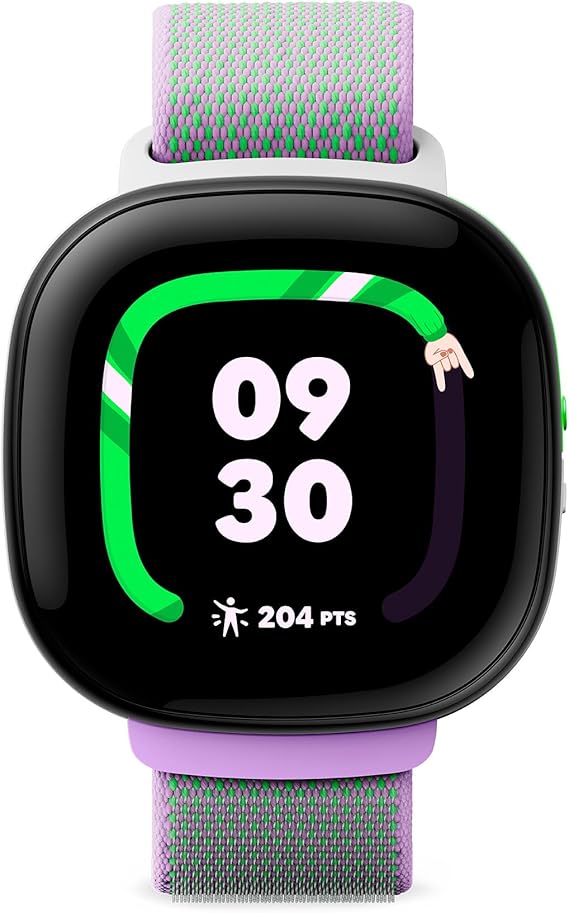
The whole experience is built around movement points.
Instead of steps or calories, the watch tracks how much your child moves throughout the day using a deliberately vague number.
That number fills up a character called a Noodle on the watch face, which transforms and evolves as the child hits their daily goal.
Arcade games on the watch only unlock when the child has moved enough to earn access.
It is a simple concept, but combining a reward system with physical activity is something that most kids genuinely respond to.
Parents who were skeptical about buying an expensive watch reported being surprised to find their child asking to go outside more often.
The watch is built on the same hardware as an adult smartwatch.
The display is large, colourful, and protected by scratch-resistant glass.
It survived three weeks of classroom and playground use in a single review without visible damage, including drops onto concrete.
Water resistance at 5ATM means swimming is fine.
For parents, the main features are GPS location tracking and communication through the Fitbit Ace app.
Calls and messages go through the app only, not through a regular phone number.
Everyone who can access the watch must be added and approved manually.
There is no internet, no social media, and no way for a stranger to contact the device.
School Time mode disables everything during school hours while keeping the emergency contact available.
Battery life is where expectations need to be managed honestly.
With regular use, games, and LTE active, the watch tends to run down by early evening.
For a child who is active all day and playing games on the watch, getting through until bedtime is possible but not guaranteed.
There is also no sleep tracking, which feels like a missed opportunity given how natural it would be to include a bedtime mode alongside all the other habit-building features.
The Eejie virtual pet character is another divisive feature.
Some kids loved customising it and caring for it.
Others lost interest quickly.
One parent described it as feeling like a chore rather than a game after the first week.
The activity games themselves are the stronger feature, and children engaged with those much longer.
If your child is between seven and eleven and the main priority is getting them moving more, this is the most genuinely fun option in the category.
For families who want sleep tracking, a longer battery, or a lower overall cost, other options on this list make more sense.
Who Should Not Buy This:
If your child is older than eleven, the gamified activity system will likely feel too young for them.
If battery life across a full active day is important, this watch cuts it close.
And at a higher price point than most kids watches, families on a tighter budget should look at other options that cover the core safety features at a lower cost.
Specifications:
| Feature | Details |
|---|---|
| Display | Large OLED with Gorilla Glass 3 |
| Battery Life | Around one day with active use |
| Water Resistance | 5ATM, swimproof |
| GPS | Built-in |
| Connectivity | LTE via Fitbit Ace Pass |
| Monthly Plan | $10 per month |
| Age Range | 7 and above |
| Sleep Tracking | Not available |
4. Apple Watch SE 3: (Best for iPhone Families Who Want Full Integration)

When a parent already has an iPhone, a teenager already wants one, and a ten-year-old is somewhere in the middle, asking for something that feels grown-up without actually being a phone, the Apple Watch SE 3 with Family Setup is often the answer that makes everyone reasonably happy.
The Family Setup feature is what makes this work.
A parent sets up the watch from their own iPhone.
The child does not need their own phone at all.
The watch gets its own number, can make calls, send messages, and share its location independently.
Parents control every contact from their iPhone through the Watch app.
They set which apps can be accessed, when the watch goes into School Time mode, and who can reach their child.
It all lives inside the same Apple ecosystem most iPhone families are already using, which means there is no new app to learn, no separate dashboard to check, and no additional account to manage.
In practice, that matters more than it sounds on paper.
Parents who switched from a dedicated kids watch to the SE 3 with Family Setup consistently mentioned how much easier it was to manage because everything was already where they knew to look.
Location shows up in Find My alongside the family’s other devices.
Messages come through iMessage.
It just works the way iPhone families expect Apple things to work.
School Time mode locks the watch display during class hours and shows a yellow ring as a visual indicator that restrictions are active.
Parents are notified if the child manually exits it by pressing the crown.
That is a minor frustration several parents mentioned.
The watch trusts the child a little more than some parents would like.
But for most children old enough to be wearing this watch, it is a reasonable trade-off.
Battery life is honest about its limitations.
Apple rates it at around 18 hours, and real-world testing with the always-on display active and normal daily use gets you to bedtime with enough battery left to track sleep, but not much margin beyond that.
Daily charging is effectively required.
The watch is also lightweight at 40mm or 44mm, which works well for children and smaller wrists without feeling oversized.
Fall Detection and Emergency SOS are included.
For families where the child might be walking home alone or spending time at activities without a parent nearby, having those safety features running passively is worth something.
What the SE 3 does not have is ECG, blood oxygen monitoring, or hypertension detection.
For a child, none of those are immediately relevant, so missing them is not a practical problem.
It also lacks the rich gamification of activity tracking that the Fitbit Ace LTE offers.
The activity rings are there, and kids who get into closing them do respond to it, but it is more passive than the game-based approach of a watch designed specifically for children.
This is worth saying clearly: the SE 3 is not built specifically for kids.
It is an adult watch with excellent parental controls.
For children aged nine and above who are mature enough to use it responsibly, that is actually a point in its favour.
It does not look like a kids watch.
It looks like a proper smartwatch, and for some children, that makes them significantly more likely to want to wear it every day.
For families looking at how smartwatches fit into broader health habits for active kids, the overview at best-smartwatches-for-sleep-tracking covers how different wearables handle overnight tracking for younger users.
Who Should Not Buy This:
If your family does not use iPhones, this watch does not apply.
Family Setup only works within the Apple ecosystem.
If your child is younger than eight or nine, a watch designed specifically for younger children with more restrictive controls and simpler features will likely serve them better.
And if the budget is tight, the monthly cellular plan adds to the cost of what is already one of the more expensive options on this list.
Specifications:
| Feature | Details |
|---|---|
| Display | Always-On LTPO Retina OLED |
| Case Sizes | 40mm and 44mm |
| Battery Life | 18 hours, daily charging required |
| Water Resistance | 50m swimproof |
| Setup | Family Setup, no child iPhone needed |
| Parental Controls | Via iPhone Watch app and Screen Time |
| Monthly Plan | Around $10 via carrier |
| Safety | Fall Detection, Emergency SOS, Find My location |
| Compatibility | iPhone families only |
5. JrTrack 5: (Best for Families Who Want Apps Without Handing Over a Smartphone)

There is a specific conversation that happens in a lot of households around the time a child turns eight or nine.
The child wants Spotify on their wrist.
The parent wants to know exactly where the child is at all times.
Neither of them wants a full smartphone to be the solution.
The Cosmo JrTrack 5 was built for that exact standoff, and it handles it better than anything else on this list.
What makes it different is the optional app library.
It is the only kids smartwatch in this category where parents can choose to install a small selection of curated, safe apps directly onto the watch.
Spotify Kids, iHeartRadio, The Week Junior magazine, GoNoodle fitness videos, Calm for breathing exercises, and a few simple games are all available.
Parents enable each one individually through the Mission Control parent app and can remove them at any time.
There is no internet browser and no way for a child to go beyond what has been explicitly unlocked.
For families where a nine-year-old is ready for a little more than just calling parents, this controlled expansion of features is genuinely useful without opening a door that cannot be closed again.
Setup is straightforward.
The watch comes with an eSIM built in, connects to the Cosmo Mobile network, which runs on major carrier towers, and the Mission Control parent app walks through the whole process in a few minutes.
Multiple parents described it as the easiest setup of any kids device they had tried.
The GPS tracking is precise.
In testing, it landed within a tight distance of the actual location, even indoors, which is a genuine strength compared to watches that struggle once a child goes inside a building.
Real-time tracking, location history, and safe zone geofencing all work from the parent app.
The SOS mode has a specific design worth knowing about.
Pressing the home button three times activates live tracking and automatically answers any incoming call with the caller muted.
The parent can call in and listen to what is happening around the child before speaking.
It is a thoughtful approach to emergency situations and one that other watches in this category do not replicate.
For kids who want music, the Spotify integration lets them listen through the watch’s speaker or pair with Bluetooth headphones.
A six-year-old using it to text their mum while listening to music at the park sounds almost too convenient, but that is exactly the kind of moment parents reported loving.
Battery life is the honest limitation.
Around 30 hours of real-world use puts it below most other options on this list.
With moderate use, including music and GPS active, some parents were charging it daily.
That is not a dealbreaker for families who already charge devices overnight, but it is worth knowing if a multi-day battery was a priority.
A small number of customer reviews mentioned connectivity issues that required resets, and a few reported problems with customer service response times when a defective unit needed to be replaced.
Those are not widespread complaints, but they exist in enough reviews to mention before you buy.
Specifications:
| Feature | Details |
|---|---|
| Display | 1.85-inch colour touchscreen |
| Battery Life | Around 30 hours real-world use |
| Water Resistance | Splash resistant, not swimproof |
| GPS | Real-time precise tracking with geofencing |
| Connectivity | Built-in eSIM via Cosmo Mobile |
| Optional Apps | Spotify Kids, iHeartRadio, GoNoodle, Calm, games |
| SOS Mode | Triple home button press, auto-listens to surroundings |
| Monthly Plan | From $12.99 per month |
| Age Range | 6 to 12 years |
6. myFirst Fone R2: (Best for Younger Kids Who Love Sharing Moments With Family)

The watch comes with a built-in eSIM, which means there is no SIM card to buy or activate separately.
The first month of connectivity is included, and plans continue monthly after that.
Set up runs through the myFirst Circle app, which manages everything from contacts to location alerts.
A few testers mentioned that the initial setup was confusing, particularly around the QR code binding process and the need for a Wi-Fi connection to generate it correctly.
Once past that first step, daily use is straightforward.
The 5MP camera is the feature that younger children use most.
They take photos, record short video clips, and send them directly to approved family contacts through the app.
Parents can also view photos remotely through a companion display called the myFirst Frame, which sits on a desk or shelf and shows the child’s posts throughout the day.
GPS tracking uses a combination of cellular signal, Wi-Fi, and motion sensors to give location updates.
Accuracy in outdoor conditions was consistently described as reliable.
Geofencing lets parents set zones around home and school with instant alerts when crossed.
The SOS button triggers in about three seconds with a long press, which is faster than the five seconds the brand advertises, and automatically records a thirty-second audio clip from the watch’s microphone when pressed.
That audio gets sent to the emergency contact alongside the location, which is genuinely useful and not something most watches in this category do.
Heart rate monitoring runs passively throughout the day, and parents receive an alert in the app if the reading exceeds a threshold they set.
For younger children who cannot always communicate how they are feeling, that quiet monitoring adds a practical layer of safety.
The watch does not have a full keyboard. Children type using predefined quick messages and voice recordings, not free-form text.
For most children aged five to eight, that limitation is actually fine.
For ten- or eleven-year-olds who want to write their own messages, it can start to feel restrictive.
Battery life with moderate use runs a full day easily, and some parents reported three to four days between charges, depending on how much video calling their child was doing.
7. Garmin Bounce: (Best for Kids Who Want a No-Nonsense GPS Watch With Activity Tracking)

My neighbor’s son is nine years old and has the kind of energy that makes parents tired just watching him.
He bikes to his friend’s house, runs around the park, swims in the summer, and is generally impossible to keep track of without some technology.
His parents tried two other kids watches before landing on the Garmin Bounce Black Camo.
Both previous options had problems that annoyed them enough to return.
This one they kept.
The Black Camo is the same watch as the other Bounce colour options but with a design that appeals to boys who find the Lilac Floral and Green Burst versions too obviously aimed at younger children.
It is priced the same and works identically.
The Garmin Bounce is built around a simple idea.
Kids need GPS tracking, basic communication with parents, and some motivation to stay active.
It does all three without trying to be a smartphone on a wrist.
There are no games to get distracted by, no social media, no camera. Parents who specifically want a device that keeps a child engaged with the real world rather than a screen find this genuinely refreshing.
Activity tracking works the same way Garmin does it on adult watches, just presented in a way that children respond to.
Steps, active minutes, sleep, and specific sports, including walking, running, swimming, and cycling, are all tracked.
Badges reward hitting daily goals. Kids who have parents with Garmin watches can even join family fitness challenges, which several parents mentioned getting unexpectedly competitive about.
GPS via the Garmin Jr. app is reliable outdoors and provides real-time location, direction, and speed via the LiveTrack feature.
Setting a geofence around home or school is straightforward, and the alert when a child crosses that boundary arrives quickly.
Battery life with LTE active runs around 35 to 40 hours for most families, which is two days of real use for a child in school mode during the day and not running GPS constantly.
Communication requires the Garmin ten-dollar monthly plan.
Without it, the watch functions only as a fitness tracker with no messaging or live location sharing.
With it, parents can send text and voice messages; children can reply with emoji stickers or short voice messages; and the Assistance feature sends an emergency alert with live location when pressed.
That emergency feature does not make a traditional phone call, unlike some other watches.
It sends an alert and activates live tracking.
For most situations, that is enough, but parents expecting a direct SOS call should know the difference.
Messaging contacts need to have the Garmin Jr. app downloaded to communicate with the watch properly.
That limits who can easily reach the child.
Grandparents and extended family members sometimes find it inconvenient to download and set up another app, and those added as caregivers receive all notifications, including activity updates and low-battery alerts, which some parents find excessive.
Specifications:
| Feature | Details |
|---|---|
| Display | Colour touchscreen |
| Colour Options | Black Camo, Lilac Floral, Green Burst |
| Battery Life | 35 to 40 hours with LTE active |
| Water Resistance | 5ATM, swimproof |
| GPS | Built-in with LiveTrack and geofencing |
| Monthly Plan | $10 per month via Garmin |
| Parental App | Garmin Jr., iOS and Android |
| Age Range | 6 to 12 years |
8. Verizon Gizmo Watch 3: (Best for Verizon Families Who Want Simplicity)
A parent on a forum said something I have come across in different forms again and again in reviews of this watch. He said he spent twenty minutes researching it, ten minutes setting it up, and has not had to think about it since. His seven-year-old uses it every day. It does exactly what it is supposed to do. No surprises, no complaints, no learning curve to speak of.
That is the Gizmo Watch 3 in a sentence. It is not trying to be the most feature-packed option in this category. It does the basics well, costs less per month than most competing subscriptions, and runs on Verizon’s network, which, for families already on Verizon, means one less thing to manage.
Set up runs through the GizmoHub app. Parents add up to twenty approved contacts and everything flows from there. Calls, messages, and location tracking all live in one place. The watch gets its own phone number, so grandparents and other family members can reach your child directly without needing to download a separate app. That is a small detail that makes a practical difference for less tech-savvy relatives.
GPS tracking is reliable outdoors and has demonstrated strong accuracy across multiple reviewers’ testing. It is less consistent indoors, particularly in schools and large buildings. The watch tends to place a child near the correct building rather than inside a specific room. For most parents checking in during school pickup, that is close enough. For parents who want precise indoor tracking, other options on this list perform better in that specific scenario.
Battery life in real-world testing, with messaging, some calls, and location services active, lasted about 2 days consistently. On lighter days with fewer calls, it stretched further. That two-day real-world number puts it well ahead of most kids watches that require daily charging.
Video calling through the front-facing camera works cleanly. Reviewers consistently described call quality as better than expected given the price point. The watch also includes several simple educational games, a weather app with air quality data, a step tracker, and an auto-answer mode that automatically picks up a parent’s call after 10 seconds. Some parents love that feature for checking in on their child without requiring the child to actively answer. Others find it feels a bit intrusive once their child is old enough to expect some privacy.
The one limitation that genuinely affects day-to-day use is that messaging only works within the GizmoHub ecosystem. Contacts need the app to receive messages directly from the watch. If a grandparent does not want to download another app, or if a friend’s parent has a different kids watch that uses a different system, that contact list of twenty people starts to fill up with people who can only receive calls, not messages. A parent who tested it for six months described his daughter actively lobbying her friends’ parents to get the same watch so they could all message each other.
Who Should Not Buy This:
If you are not on Verizon or do not have strong Verizon coverage in your area, this watch does not work properly. The GPS, calls, and messaging all depend on that network. If music streaming, fitness gamification, or a social photo-sharing feature matter to your child, other watches on this list offer those things. And if you want indoor GPS accuracy, this watch will frustrate you in that specific area.
Related Posts:
Best Smartwatches in 2026 | Battery, Health & Value Compared
Luis Cooper

Hi, I'm Luis, the guy behind this site. I love wearing watches, especially ones that look great on small wrists (mine are about 6.3" around). The Watches Geek is dedicated to helping you learn about and buy watches that you will love wearing. I want this website to be the last destination for people to pick the best watches to fit their needs. You can find our unbiased reviews here on Thewatchesgeek.