
Last Updated on October 10, 2026 by Luis Cooper
If you are thinking about buying a smartwatch and wondering whether it will drain your phone battery faster, you’re in the right place.
The short answer is yes, a paired smartwatch does use some of your phone’s battery.
But the real answer is more useful than that: how much it drains depends on several specific things, most of which you can control. Some of them you can fix in under two minutes.
This guide explains what happens inside your phone when it is connected to a smartwatch, which factors make the drain worse, and what you can do to keep it to a minimum.
Does a Smartwatch Drain Your Phone Battery
Why Your Phone Uses Battery When Connected to a Smartwatch
Your smartwatch needs your phone to do several things: receive notifications, sync health data, download map updates, fetch weather, and communicate with apps.
All of this happens over Bluetooth.
The good news is that modern smartwatches use a technology called Bluetooth Low Energy, or BLE. I
t was designed to keep devices connected while using as little power as possible.
BLE uses up to 90 percent less energy than the older Classic Bluetooth standard that older devices used for things like audio streaming.
So the Bluetooth connection itself, when it is just sitting there paired and idle, barely touches your battery.
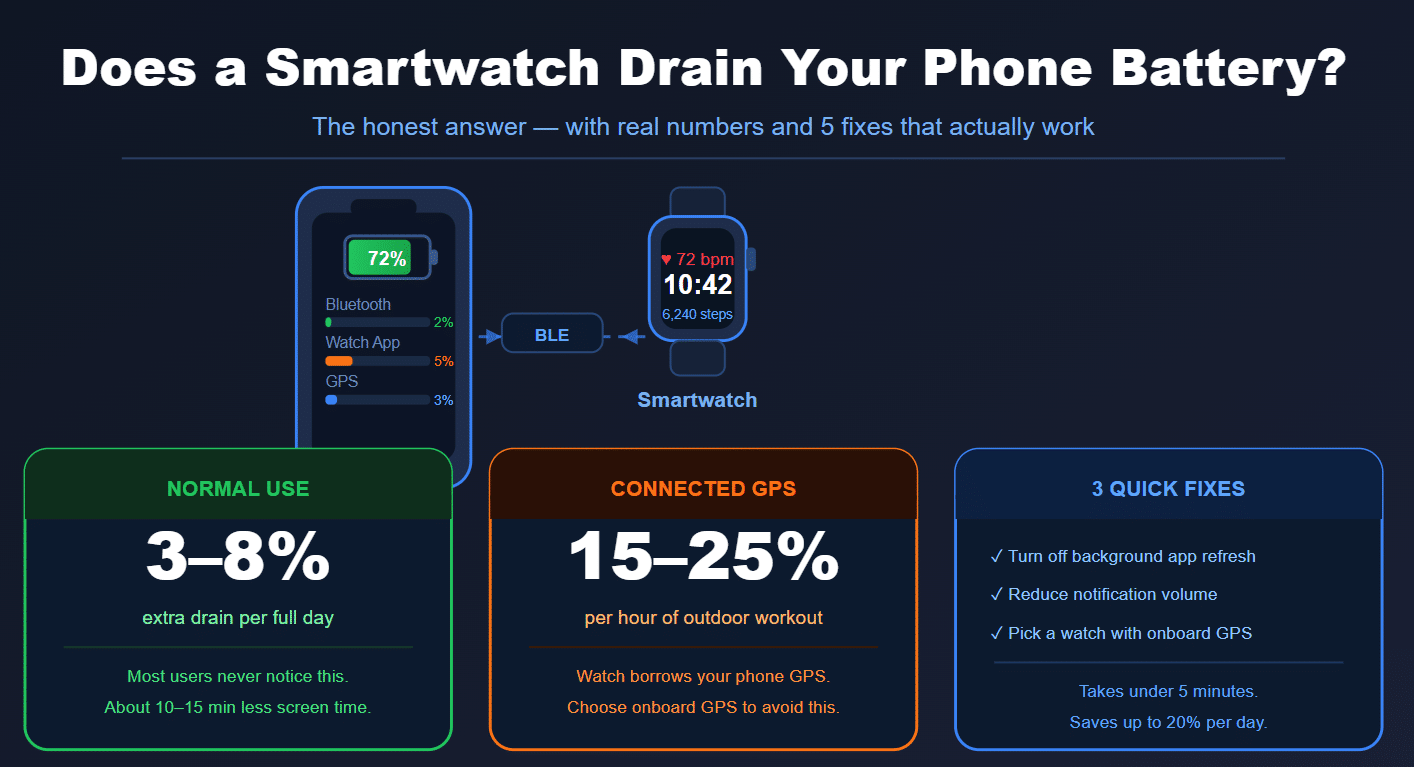
Bluetooth usage data shows that leaving Bluetooth on but not actively transferring data drains about 1.8 percent of a typical smartphone battery over an entire day.
That is about 10 to 15 minutes of screen time.
Most people would never notice.
The problem is not the connection.
The problem is what runs on top of it.
The Three Real Causes of Battery Drain
1. The Companion App Running in the Background
Every smartwatch requires a companion app on your phone.
Garmin needs Garmin Connect.
Apple Watch uses the Watch app built into iOS.
Pixel Watch and Fitbit use the Google Pixel Watch app and Fitbit app respectively.
These apps run in the background, constantly checking for new data to sync, pushing notifications to your watch, and refreshing health information.
This background activity is where most of the battery drain actually comes from, not the Bluetooth connection itself.
Real users on Garmin’s official support forum have reported Garmin Connect consuming approximately 2 percent of their iPhone battery per hour, even without any active use.
One user reported losing 65 percent of their battery overnight with the app running.
These are edge cases, not typical behavior, but they show what can happen when a companion app isn’t optimized or runs a background process incorrectly.
The Apple Watch app is generally better managed because Apple controls both sides of the equation, but any companion app that does heavy background syncing will drain your battery.
2. GPS Offloading During Workouts
Many smartwatches, especially mid-range models, do not have their own GPS chip.
Instead, they borrow GPS signal from your phone during outdoor workouts.
This is called connected GPS.
When your watch is actively using your phone’s GPS signal, the drain is significant. GPS is one of the most battery-hungry features on any smartphone.
Running a 5K with connected GPS can use the same amount of phone battery as 30 to 45 minutes of video playback.
Watches with standalone GPS, like the Garmin Forerunner 170, Garmin Venu 4, and Google Pixel Watch 5, track your route using their own built-in GPS chip and don’t use your phone’s location service during workouts.
This is one of the most underappreciated reasons to choose a watch with onboard GPS.
3. Notification Volume and Sync Frequency
Every notification your phone receives and pushes to your watch requires a small Bluetooth data transfer.
One or two notifications barely register.
But if your phone is receiving 80 to 100 notifications a day from messaging apps, social media, and email, each one triggers a sync event.
The more frequently your watch syncs data, the more both devices work.
Watches set to sync every few minutes use noticeably more battery on both ends than watches that sync every 15 to 30 minutes.
How Much Does It Actually Drain? Real Numbers
For a typical modern smartphone paired with a modern smartwatch with onboard GPS, the realistic additional battery drain from the pairing is between 3 and 8 percent of your phone’s battery over a full day.
That means if your phone normally lasts 20 hours before needing a charge, adding a paired smartwatch might bring that down to 18 to 19 hours under normal conditions.
Most people will not notice the difference in day-to-day use.
The cases where drain becomes significant:
- Using connected GPS for workouts: adds 15 to 25 percent battery use per hour of GPS activity
- A poorly optimized companion app with unchecked background refresh: can add 10 to 20 percent per day
- Very high notification volume: adds 3 to 5 percent extra per day
Which Watches Drain Your Phone the Most
Apple Watch drains iPhone battery the least in typical use because both Apple Watch and iPhone are made by Apple. The software is designed to work together efficiently. The Watch app on iPhone is tightly integrated and avoids unnecessary background processes.
Wear OS watches (Google Pixel Watch, Samsung Galaxy Watch) generally manage phone battery well on Android because Google and Samsung both optimise their apps for their own platforms. On iPhone, Wear OS watches aren’t compatible, so this isn’t a concern.
Garmin watches are excellent fitness devices but Garmin Connect has a known history of background drain issues on iOS specifically. It appears prominently in battery usage lists for many iPhone users. The issue varies by phone model and iOS version. Keeping Garmin Connect updated and limiting its background refresh helps significantly.
Screenless trackers like the Whoop 5.0 and Google Fitbit Air sync less often by design, so their companion apps generally use less phone battery than full smartwatch apps.
Five Things You Can Do Right Now to Reduce Drain
1. Limit background app refresh for your smartwatch app. On iPhone: Settings, General, Background App Refresh. Find your watch app and turn it off or set it to Wi-Fi only. Your watch will still sync when you open the app or when your phone is charging. You will not miss anything important.
On Android: Go to Settings > Apps, find your watch companion app, tap Battery, and set it to Restricted.
2. Reduce notification volume. Review your phone’s notification settings and turn off notifications from apps you don’t need on your wrist. Every notification you eliminate is one less Bluetooth transfer per day.
3. Choose a watch with onboard GPS if you work out outdoors. If you run, cycle, or hike regularly and want route tracking, a watch with its own GPS chip lets you skip your phone’s GPS during workouts. The Garmin Forerunner 170 and Garmin Venu 4 both have standalone GPS.
4. Keep your companion app updated. Outdated companion apps often have background bugs that are fixed in newer versions. A five-second update check can sometimes cut drain significantly.
5. Sync on a schedule instead of continuously. Some companion apps let you set the sync frequency. If yours does, choose every 15 to 30 minutes rather than continuous. You will still get all your data; it will just arrive in batches.
Does It Matter What Phone You Have?
Yes, but not as much as you might think. A phone with a larger battery will lose the same number of percentage points to smartwatch drain but feel it less in absolute terms.
An iPhone with a 4,000 mAh battery will lose the same 5 percent as a phone with a 5,500 mAh battery, but the larger battery phone has more total capacity to absorb it.
Older phones with degraded batteries feel smartwatch drain more acutely than newer phones, not because the smartwatch draws more power, but because the battery has less capacity to begin with.
What About Leaving Bluetooth On All the Time?
Some people assume turning Bluetooth off when not near their watch will save battery.
In reality, an idle BLE connection uses so little power that the savings from switching it off manually are negligible.
Turning Bluetooth completely off saves perhaps 1 to 2 percent per day, which is barely worth the inconvenience of reconnecting every time.
The smarter approach is to address the real drain sources: background app activity, GPS usage, and notification volume.
Those have a far greater impact than toggling Bluetooth.
The Bottom Line
A paired smartwatch will slightly drain your phone battery. Under normal conditions and with a well-optimised companion app, the real-world impact is 3 to 8 percent over a full day. That is minor for most people.
It becomes noticeable in GPS workouts, companion apps with excessive background refresh, and very high notification volume. All three are fixable.
If phone battery life is a serious concern for you, choose a watch with standalone GPS, spend five minutes adjusting background refresh settings, and trim your notifications. Do that, and most people genuinely won’t notice the difference between having a paired smartwatch and not.
Related Articles You Might Find Useful
Looking for a watch with solid onboard GPS to keep your phone battery safe during workouts? See our guide on the best smartwatches for runners.
If you track your health around the clock and want wearables with the best features without ongoing subscription costs, our Black Friday wearable deals guide covers nine options across smartwatches, screenless trackers, and smart rings.
Trying to figure out which smartwatches charge subscription fees? TWG’s article on smartwatch subscription costs breaks down exactly what each brand charges beyond the hardware.
Frequently Asked Questions
Does keeping Bluetooth on all day drain my phone? Idle Bluetooth in BLE mode drains approximately 1.8 percent of your phone battery over a full day. That is about 10 to 15 minutes of screen time. The much larger drain comes from companion app background activity, not the Bluetooth connection itself.
Which smartwatch drains iPhone battery the least? Apple Watch drains iPhone battery the least because Apple controls both devices and optimizes the software connection between them. It integrates directly into iOS without needing a third-party background app.
Does a Garmin watch drain my iPhone battery? Garmin Connect has been reported to drain iPhone battery more than typical apps, with some users reporting around 2 percent per hour in background use. Limiting Background App Refresh for Garmin Connect in iPhone settings significantly reduces this.
Does a smartwatch drain battery faster than wireless earbuds? Generally yes. Earbuds use Bluetooth for audio streaming only when you are actively listening. A smartwatch uses Bluetooth continuously for notifications, health sync, and app data throughout the day.
My phone has Bluetooth, but if I turn it off, will the smartwatch still work? Without Bluetooth, most smartwatch features that rely on the phone—notifications, weather, syncing apps and so on—will stop working. The watch will still track steps, heart rate and workouts using its own sensors and store the data locally. When Bluetooth reconnects, it syncs everything back up.
Does GPS on my smartwatch drain my phone? If your watch has onboard GPS, no. It tracks routes independently without touching your phone’s location service. If your watch uses connected GPS and borrows your phone’s signal, yes, it can drain your phone significantly during outdoor workouts.
Luis Cooper

Hi, I'm Luis, the guy behind this site. I love wearing watches, especially ones that look great on small wrists (mine are about 6.3" around). The Watches Geek is dedicated to helping you learn about and buy watches that you will love wearing. I want this website to be the last destination for people to pick the best watches to fit their needs. You can find our unbiased reviews here on Thewatchesgeek.