Last Updated on November 7, 2026 by Luis Cooper
With so much to prepare for, educators must provide adolescents with an adequate education, and teaching is seldom easy.
In addition to working a full day at educational institutions, which often lasts up to eight hours, teachers also have extracurricular responsibilities such as planning lessons, gathering materials for their students, holding parent-teacher meetings, and grading homework.
Even after school hours, teachers might plan sporting events and competitions with other schools or prepare students for a school production, giving them access to a variety of opportunities and helping them reach their full potential.
Maintaining order and using modern technology to reduce pressure is a welcome boost for any teacher, as teaching is a fulfilling profession, but the added juggling can come at the expense of a teacher’s private life.
Investing in a feature-rich wristwatch is one of the best ways for educators to prepare for their academic responsibilities.
In this column, we’ll look at some of the top smartwatches for educators, whether you work in junior high, secondary school, or university.
Which are the Best Smartwatches for Teachers?
Here are my recommended top 6 Best Smartwatches for Teachers:-


Apple Watch SE 3: (Best Smartwatch for Teachers Who Use iPhone)

A high school English teacher described the moment she stopped finding lesson timers frustrating.
She had been using her phone timer — setting it on the desk, picking it up to check remaining time, sometimes accidentally dismissing it mid-lesson while trying to show it to students.
The Apple Watch SE 3 let her set a timer on her wrist before the lesson started and feel a silent vibration when the timer ended.
The class did not know the timer had ended.
She knew immediately.
She described that workflow change as the one that made the watch genuinely useful for teaching, not just another thing to manage.
Classroom Tools Built Into the Platform:
The Apple Watch SE 3 carries watchOS’s full notification management platform, which, for teachers, means granular control over what vibrates on the wrist during lessons.
Focus modes set from the iPhone suppress non-essential notifications while keeping calendar alerts, specific contact calls, and custom triggers active.
A teacher can receive a vibration when the school admin calls during class and receive nothing from email, social media, or shopping apps — all from a setting configured before the school day that runs automatically by time or location.
The double-tap gesture — tapping thumb and forefinger together without touching the screen — lets you answer a wrist call during a lesson without fumbling with the watch face while continuing to supervise students.
Fall detection and emergency SOS address the occasional physical incidents in the school environment.
The 40mm and 44mm case options suit a range of wrist sizes.
SafeWise’s 2026 senior wearable analysis confirmed the Apple Watch as providing the most complete combination of safety features and daily usefulness, which, for teachers, means a watch that covers both the professional classroom context and the daily health monitoring teachers with physically demanding schedules need.
For a broader look at how the Apple Watch SE 3 compares across health and calling features for active daily users, the full guide, Best Smartwatches for Calling and Texting, covers the Apple Watch platform in detail.
Who Should Not Buy This:
Android phone users cannot pair the Apple Watch SE 3.
If the phone in your pocket is a Samsung, OnePlus, Xiaomi, or any Android device, this watch does not work with it.
The Google Pixel Watch 4 and OnePlus Watch 3 below are specifically for Android teachers.
Specifications:
| Feature | Details |
|---|---|
| Case Sizes | 40mm and 44mm |
| Battery | 18 hours |
| Notifications | Focus mode — suppress non-essential alerts during lessons |
| Gestures | Double-tap to answer calls |
| Safety | Fall detection, emergency SOS |
| Timers | Wrist-based lesson timer |
| Compatibility | iPhone only |
Google Pixel Watch 5: Best Smartwatch for Android Teachers With Gemini AI

Teachers don’t always have time to reach for a phone.
Between lessons, staff meetings, marking work, and answering messages, even small interruptions can become frustrating.
This is where a smartwatch can help, especially one that works closely with the apps used throughout the day.
The Google Pixel Watch 5 is a strong option for teachers who use Android phones.
Its biggest attraction is the combination of Google’s services, Gemini assistance, and everyday health tracking.
It isn’t a watch designed specifically for schools, but several features make sense for someone whose workday is built around a busy timetable.
A More Convenient Way to Handle Everyday Tasks
Gemini is one of the main reasons to consider this model.
Instead of opening an app on a phone, teachers can raise their wrist and ask the assistant to do tasks for them.
Teachers can set a timer for a classroom activity, check a reminder, or look up information through voice interaction.
Google’s proactive suggestions add another useful layer.
For example, the watch can bring relevant calendar information to the screen when it is needed, rather than making the user search through different apps.
This is a small convenience, but it can be helpful when there is little time between classes.
These tools still have limitations.
Gemini needs an internet connection for many requests, and users should check its answers rather than treating them as automatically correct.
Some advanced assistance also depends on supported languages, countries, and Google services.
Notifications Without Constant Phone Checks
Teachers often need to stay reachable without letting every phone notification interrupt a lesson.
The Pixel Watch 5 makes it easier to see incoming calls, messages, and calendar alerts at a glance.
Wear OS also supports compatible messaging apps, so users can respond from the watch when the app and phone connection allow it.
Quick replies work well for short messages, although writing a longer response on a small screen isn’t particularly practical.
Another sensible option is to adjust notification settings before the school day begins.
Teachers can mute non-essential alerts while keeping important calls or selected contacts available.
That gives teachers more control over when they need to look at their wrist.
Health Tracking During a Long Day at School
A teaching day can involve more walking and standing than people expect.
The Pixel Watch 5 tracks steps, heart rate, workouts, and sleep, giving users a clearer picture of their daily activity.
It can also record supported exercise sessions after school.
The watch includes an ECG app and irregular heart rhythm notifications in supported regions.
Google also offers health trend features through its Health Guardian tools.
These are intended to provide general wellness information, not a medical diagnosis or a replacement for professional monitoring.
For teachers who supervise outdoor activities or travel between school locations, the watch’s safety features may also be worth considering.
Fall Detection and Emergency SOS are available, while Loss of Pulse Detection and other emergency functions have specific eligibility and regional requirements. Enable and check these features before relying on them.
Choosing the Right Size and Getting Through the School Day
Google sells the Pixel Watch 5 in 41mm and 45mm sizes.
The smaller version likely suits people who prefer a less noticeable watch, while the 45mm model offers more room to read notifications and interact with the display.
Battery life is an important consideration. Google rates the 41mm model for up to 30 hours and the 45mm model for up to 40 hours with the always-on display enabled.
Those are manufacturer estimates, not guaranteed results.
Frequent GPS use, calls, notifications and other demanding features can reduce battery life.
Charging is relatively quick. Google says the 41mm version reaches around 50% in 15 minutes, while the larger model takes about 15 minutes to reach the same level.
A short charge before getting ready for school may be enough to make a meaningful difference, although the watch will still need regular charging.
The display is another practical strength.
Its peak brightness reaches 3,000 nits, which helps when checking the screen outdoors or in bright surroundings.
The watch also has 5 ATM water resistance and an IP68 rating, though this doesn’t mean it is indestructible or suitable for every water activity.
Is the Pixel Watch 5 Worth Choosing?
The Pixel Watch 5 makes the most sense for teachers who already use Android and rely on Google services.
Gemini, calendar notifications, timers, and health tracking give it several everyday uses beyond simply showing the time.
It is less appealing if battery life is the main priority.
Some fitness watches can last considerably longer between charges.
It is also not compatible with iPhones, and certain health and AI features may not be available in every country.
Android users who want a polished smartwatch with useful communication tools should consider Google’s latest model.
Just make sure the features you intend to use are supported in your region before buying.
Google Pixel Watch 5 Specifications
| Feature | Details |
|---|---|
| Case sizes | 41mm and 45mm |
| Display | Actua 360 AMOLED, up to 3,000 nits |
| Processor | Snapdragon W5 Gen 2 Accelerated |
| Operating system | Wear OS 7 |
| Battery life | Up to 30 hours (41mm), 40 hours (45mm) with AOD |
| Battery Saver | Up to 48 hours (41mm), 72 hours (45mm) |
| GPS | Dual-frequency GPS |
| Health tracking | Heart rate, sleep, SpO2, ECG and activity tracking |
| Safety features | Fall Detection, Emergency SOS and supported Loss of Pulse Detection |
| Water resistance | 5 ATM and IP68 |
| Phone compatibility | Most Android phones running Android 12 or newer |
OnePlus Watch 4: Best Long-Battery Smartwatch for Teachers

A smartwatch can be useful during a busy school day, but one thing can quickly become annoying: having to charge it every night.
Teachers already have enough things to remember, from lesson plans and meetings to checking assignments.
A watch that can last several days between charges makes more sense for this kind of routine.
The OnePlus Watch 4 is worth considering for Android users who put battery life high on their list.
OnePlus rates it for up to five days in Smart Mode, with around three days under heavy use.
Those are manufacturer figures rather than guaranteed results, but they give the watch an advantage over many Wear OS models that need charging much more frequently.
Less Time Charging, More Time Using It
The Watch 4 has a 646mAh battery.
OnePlus quotes up to five days in Smart Mode, three days with heavy use, and up to 16 days in Power Saver mode.
The difference between these figures matters. Frequent GPS use, active health monitoring, and lots of notifications will affect how long the battery lasts.
For a teacher, the practical benefit is simple: you can charge it before the start of the school week and have more flexibility about when to top it up.
You should still expect to charge it regularly, particularly if you use it for workouts and sleep tracking.
According to OnePlus, the watch takes about 75 minutes to charge fully.
Keep that in mind if you prefer charging your watch while getting ready in the morning rather than leaving it on the charger overnight.
Useful Features for Managing a School Day
The OnePlus Watch 4 runs Wear OS 6 with OnePlus’s OxygenOS Watch 8 interface.
This gives it access to Google’s smartwatch ecosystem, including notifications and supported apps.
Teachers can check incoming messages, calendar alerts, and calls from their wrist when the watch is connected to a compatible Android phone.
Gemini and Google Assistant are listed among its voice assistant options.
This can be handy when your hands are occupied.
You may use voice commands for supported tasks such as setting a timer or checking information, rather than stopping to search through your phone.
One limitation to know before buying: the Watch 4 does not support eSIM.
It is not a standalone cellular watch, so don’t expect it to make calls and receive mobile data independently when you leave your phone behind.
For most teachers who carry their phone during the school day, this may not be a problem.
For someone who wants to leave the phone at home, it is a major drawback.
A Large Display, but Not a Small Watch
The OnePlus Watch 4 has a 47.4mm round case and a 1.5-inch LTPO OLED display with a 466 × 466 resolution.
The screen is protected by sapphire crystal, and its brightness can reach up to 3,000 nits in the supported sports mode.
This combination is useful for checking messages outdoors, reading workout information, or glancing at notifications in bright conditions.
The large screen also gives you more room to interact with menus than a smaller watch display.
However, size is a genuine consideration.
The watch weighs approximately 43g without the strap and around 68g with it.
Teachers with smaller wrists, or anyone who prefers a light and discreet watch, may find it bulky during long working hours.
If possible, try the 47mm case on your wrist before buying.
Health Tracking After a Busy Day
Teaching can involve plenty of walking and standing, even when it does not feel like a workout.
The OnePlus Watch 4 can track daily activity, heart rate, blood oxygen levels, sleep, and supported exercise sessions. Its temperature sensor and health-trend features provide additional information about changes in your routine.
OnePlus also lists fall detection and a 60-second Wellness Overview.
ECG availability in that overview depends on local certification and registration, so buyers should not assume every health function will work in every country.
These features are useful for general wellness tracking, but they do not turn the watch into a medical device.
Blood oxygen and heart-rate readings from a wrist wearable should not replace medical tests or advice when you have a health concern.
For teachers who want to become more active outside school, the watch supports more than 100 sports modes.
It can automatically recognize selected activities, including walking, running, and cycling.
That makes it easier to keep track of exercise without manually starting every supported activity.
Built for Everyday Wear
OnePlus uses a titanium-alloy case and sapphire crystal protection on the Watch 4.
The watch also carries 5ATM, IP68, and IP69 durability ratings, along with MIL-STD-810H certification.
This gives it useful protection against everyday exposure to water, dust, and demanding conditions.
Still, durability ratings do not mean the watch is indestructible.
It is sensible to follow OnePlus’s care instructions, especially after exposure to water, soap or cleaning products.
Its size and weight make it more noticeable than a slim fitness band, but the sturdy construction may appeal to teachers who want one watch for work, exercise and everyday use.
Is the OnePlus Watch 4 Right for Teachers?
The OnePlus Watch 4 makes the most sense for teachers who use an Android phone, want access to Wear OS apps, and would rather not charge their smartwatch every night.
Its battery rating is the main reason to choose it, while the large display, voice assistant support, and activity tracking make it useful beyond the classroom.
It is not the right choice for everyone.
The 47mm case may feel too large on smaller wrists, and the lack of eSIM means it cannot replace a phone for independent cellular use.
Teachers who want a compact watch or a smaller case should compare other options before deciding.
If battery life matters more than the smallest or lightest design, the OnePlus Watch 4 deserves a place on your shortlist.
OnePlus Watch 4 Specifications
| Feature | Details |
|---|---|
| Case size | 47.4 × 47.4 × 11.0mm |
| Case material | Titanium alloy |
| Weight | Approx. 43g without strap; 68g with strap |
| Display | 1.5-inch LTPO OLED |
| Resolution | 466 × 466 pixels |
| Display protection | Sapphire crystal |
| Processor | Qualcomm Snapdragon W5 with BES 2800 |
| Memory | 2GB RAM, 32GB storage |
| Operating system | Wear OS 6, OxygenOS Watch 8 |
| Battery capacity | 646mAh |
| Battery life | Up to 5 days Smart Mode; 3 days heavy use |
| Power Saver | Up to 16 days |
| Charging time | Approximately 75 minutes |
| GPS | Dual-band L1 + L5 |
| Health tracking | Heart rate, SpO2, sleep, wrist temperature and activity |
| Safety | Fall Detection |
| Water and dust resistance | 5ATM, IP68 and IP69 |
| Cellular connectivity | No eSIM |
| Voice assistant | Gemini / Google Assistant |
COROS PACE Pro: (Best Smartwatch for PE and Sports Teachers)

A PE teacher and cross-country coach described the COROS PACE Pro as the first watch she owned that genuinely understood her professional context rather than simply tolerating it.
She needed a watch that survived pool-side session supervision, cross-country course walks in wet conditions, and gym classes where contact with equipment was constant.
She needed GPS accuracy on the school’s cross-country course, where tree cover regularly confused less capable GPS systems.
She needed battery life that covered the full training calendar week — five school days, two weekend races, and several evening sessions — without charging.
The COROS PACE Pro covered all three requirements without compromise.
20-Day Battery and 1500-Nit AMOLED for Sports Teaching:
COROS designed the PACE Pro around outdoor training, and its strongest features reflect that purpose.
It combines a bright 1.3-inch AMOLED display, dual-frequency GPS, offline maps, and 32GB of storage for music and route data.
Battery life is another advantage, with up to 20 days of daily use under COROS’s specified conditions and up to 31 hours in Dual Frequency GPS mode.
For PE teachers and coaches who spend time outdoors, these features are more relevant than smartwatch functions such as contactless payments or a large app store.
For PE teachers who also run or do endurance training, COROS provides useful personal performance data, including training load, estimated VO2 max, recovery information, and structured training plans.
These insights can help users understand their training progress, but they shouldn’t be confused with tools for monitoring an entire team of students.
The 1500-nit AMOLED display reads clearly in outdoor PE conditions — direct summer sunlight on a sports field is one of the most challenging environments for watch readability.
The 32GB storage covers music for pool-deck supervision and GPS maps for orienteering and outdoor education activities.
The PACE Pro uses a digital dial and a separate back button alongside its touchscreen.
This gives teachers and coaches another way to navigate menus and workout screens without relying entirely on touch controls, which can be useful during outdoor training sessions.
Both 5 ATM water resistance and GPS accuracy in complex terrain with tree cover make the PACE Pro genuinely suitable for the mixed environments sports teachers move through daily.
Who Should Not Buy This:
Classroom-based teachers who do not coach sports or supervise outdoor PE will find the COROS PACE Pro’s athletic-training depth beyond their needs.
The CMF Watch 3 Pro, Amazfit Balance 2, or TicWatch Pro 5 below provide broader classroom utility at appropriate price points.
If contactless payment and social smartwatch features matter, COROS doesn’t include them.
Specifications:
| Feature | Details |
|---|---|
| Display | AMOLED 1.3 inch, 1500 nits |
| Battery |
Up to 20 days (daily use, AOD off); up to 6 days (AOD on). GPS: Up to 38 hours All Systems or 31 hours Dual Frequency. |
| Storage | 32GB (maps and music) |
| ECG |
Not officially listed as a supported feature by COROS |
| GPS | Dual-frequency |
| Navigation | Physical Digital Crown |
| Water Resistance | 5 ATM |
| Compatibility | iOS and Android |
CMF Watch 3 Pro: (Best Affordable Smartwatch for Budget-Conscious Teachers)

A primary school teaching assistant who manages a classroom salary alongside a mortgage described the CMF Watch 3 Pro as the watch she could justify from her own budget, rather than adding it to a wish list.
She had been comparing watches for four months and consistently finding that the watches she wanted most cost more than she had decided to spend.
The CMF Watch 3 Pro was the watch she bought after a colleague brought theirs in, and she tried it on for twenty minutes.
She liked the sharp AMOLED display and found the Active Score useful for keeping track of her daily movement.
The 131 sports modes also gave her plenty of activity options for PE sessions and after-school sports clubs.
Nothing’s Sub-Brand Delivers Surprising Value:
CMF by Nothing is the accessible sub-brand of Carl Pei’s Nothing company — the same design-forward technology brand behind the Nothing Phone and Nothing Ear.
The CMF Watch 3 Pro launched with the specific positioning of delivering features that outperform its price bracket in display quality, AI health features, and software integration.
The 1.43-inch AMOLED display, with heart rate tracking, sleep monitoring, GPS, and 130-plus sport modes, covers the full range of health and activity tracking teachers need.
The Watch 3 Pro uses an Activity Score to give users a clearer picture of their daily movement.
It combines heart-rate data with activity intensity, measured using MET values, rather than relying only on step counts.
For teachers who spend much of the day walking between classrooms or standing during lessons, this offers a useful way to see how much activity builds up over the week.
Bluetooth calling works from the wrist.
Its IP68 rating provides protection against dust and certain water exposure, making it suitable for everyday situations such as light splashes and unexpected rain.
However, teachers who regularly supervise swimming sessions should choose a watch specifically designed and rated for swimming.
Compatible with both iOS and Android, the CMF Watch 3 Pro is the only watch on this list that works with any phone, regardless of platform — an advantage in a school where staff use mixed iPhone and Android devices, and a gift purchase might not be paired to a known phone.
Who Should Not Buy This:
If long battery life of five days or more is the priority, the OnePlus Watch 3 and COROS PACE Pro provide that, whereas the CMF Watch 3 Pro’s battery is more modest.
If premium build materials are important, the OnePlus Watch 3’s titanium-and-sapphire construction is on a different level.
The CMF Watch 3 Pro’s strength is value — more features per pound than almost any alternative at its price.
Specifications:
| Feature | Details |
|---|---|
| Display | AMOLED 1.43 inch |
| AI | Energy Score — morning readiness |
| Health | Heart rate, sleep, SpO2, GPS |
| Calling | Bluetooth calling |
| Sport Modes | 130 plus |
| Water Resistance | IP68 |
| Compatibility | iOS and Android |
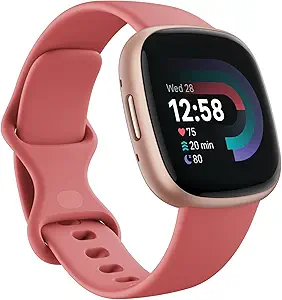
Fitbit Versa 4: (Best Fitness Smartwatch for Teachers)
Features:
Daily Preparedness Tracking:
Fitbit’s Daily Readiness Score uses information such as recent activity, sleep, and heart-rate variability to help users understand their recovery.
It can indicate whether to plan a demanding workout or take it easy.
The score is intended for personal fitness guidance, not as a measure of mental readiness for teaching.
This information helps you better plan your schedule and recovery.
GPS:
The GPS feature lets you precisely track your exercise patterns and record outdoor workouts.
An integrated app can help you analyze elevation changes and pace differences, and even provide a graphical representation of your training route.
What makes it the best:
Heart Rate Tracking Continually:
This continuous heart rate tracking captures periods of elevated heart rate across various activities, as well as heart rate per second.
You can use this information to tailor your workouts to specific training zones for better fitness results.
40+ Activity Modes:
Fitbit offers more than 40 exercise modes, including running, cycling, strength training, HIIT, kayaking, and swimming.
Teachers can use these modes to track different activities and view workout statistics directly on the watch.
Metrics and comments are adjusted based on the mode and the task at hand.
For example, it may track laps and various swimming strokes in aquatic mode, while in yoga mode, it emphasizes controlled breathing and calm.
Conclusion:
The Fitbit Versa 4 works with the Fitbit app to help users review their daily activity, exercise history, sleep information, and heart-rate trends in one place.
With your unique Daily Readiness rating, you can tell when you’re ready for something new or need a recovery day.
You can track more workouts than ever before, all from a wristband.
Buying Guide: How to Choose the Right Smartwatch for Teachers
A smartwatch that works well for one teacher may not suit another. Someone teaching young children may care more about silent timers and quick reminders, while a PE teacher might need accurate GPS, workout tracking and a battery that lasts several days. Before choosing a model, think about how you spend your workday. Here are the features worth checking before you decide.
1. Check Phone Compatibility Before Anything Else
This is the first thing to get right. Not every smartwatch works with every smartphone, and some features become unavailable when you pair a watch with a phone from a different brand.
Apple Watch models require an iPhone. Google Pixel Watch models require a compatible Android phone, while some other watches work with both Android and iOS but offer different features depending on the phone.
Think about the phone you use every day, not just the watch you like the look of. If you regularly use Google Calendar, Apple Calendar or a school communication app, check whether its notifications and companion features work properly with your chosen watch.
A watch that cannot connect to your phone properly will quickly become frustrating, no matter how impressive its specifications look.
2. Look for Reliable Silent Notifications
Teachers often need to stay reachable without checking their phones during lessons. This makes notification control more useful than simply having lots of apps on the watch.
Look for adjustable vibration, Do Not Disturb settings and the ability to choose which apps or contacts can send alerts. For example, you may want to receive an important call from the school office while keeping social media notifications silent.
Pay attention to how the vibration feels, too. A notification should be noticeable to the wearer without becoming a distraction for students. If possible, try the watch before buying it, because vibration strength and comfort can vary between models.
3. Choose a Watch With Useful Timers and Reminders
Timers are among the most practical smartwatch features for classroom work. They can help you manage reading exercises, group activities, short tests and lesson transitions without keeping a phone on your desk.
A good watch should make it easy to start a countdown, stop it and receive a vibration when time is up. Multiple timers can be useful when different classroom activities are running at the same time, but check whether your chosen model supports this rather than assuming all watches do.
Calendar reminders are equally useful. They can alert you about staff meetings, parent conferences and other appointments. Remember, displaying a calendar notification doesn’t always mean you can view or edit your entire timetable from the watch.
4. Decide Whether You Need Calls and Text Replies
Some teachers prefer to leave their phone in a bag during lessons and check important messages from their wrist during breaks. In that situation, a smartwatch with a built-in speaker and microphone can be useful.
However, calling support varies. Some watches can handle calls only while connected to a nearby phone, while cellular models can make calls independently with a compatible carrier plan.
Text replies also depend on the operating system and messaging app. Certain watches offer voice dictation, quick replies or a small on-screen keyboard, while others mainly display incoming messages.
If communication is a major reason for buying a watch, take a look at our guide to the best smartwatches for calling and texting. It covers this feature in more detail.
5. Do Not Overlook Battery Life
Battery life matters most when you wear a watch all day and want to use it for sleep tracking at night.
Some full-featured smartwatches need charging every day or two. Others, especially fitness-focused models, can last several days or longer. The advertised battery figure is not always what you will get in normal use.
Always-On Display, frequent GPS sessions, Bluetooth calls and continuous health monitoring can reduce battery life. If you choose a watch with a short battery rating, think about when you will realistically charge it.
For teachers who do not want another device to charge every evening, a longer-lasting model such as the OnePlus Watch 4 or COROS PACE Pro may be a better fit than a watch designed around daily charging.
6. Consider Comfort and Screen Readability
A smartwatch needs to feel comfortable after several hours of wearing it. A large case may provide more room for notifications, but it can feel heavy or awkward on a smaller wrist.
Check the case diameter, thickness and weight rather than judging the watch from photographs alone. The strap matters too. A soft, adjustable strap is often more comfortable for long working days than a stiff or heavy one.
Screen brightness is another practical detail. Teachers who supervise outdoor activities may find a bright display easier to read in sunlight. Indoors, a clear screen with readable text and simple menus can make everyday use less frustrating.
If possible, try the watch on your wrist before ordering. A model that looks attractive online may feel quite different after a full day of wear.
7. Match Fitness Features to Your Teaching Role
Not every teacher needs advanced sports tracking. A classroom teacher may be perfectly happy with step counting, heart-rate monitoring and basic activity records.
PE teachers, sports coaches and teachers who regularly lead outdoor activities have different needs. For them, built-in GPS, workout modes, route tracking and longer battery life can be more valuable.
Check the GPS specification carefully. Some watches use built-in GPS, while others rely on a connected phone for location tracking. If you plan to record outdoor runs without carrying your phone, standalone GPS is worth looking for.
Health features such as heart-rate and sleep tracking can also provide general wellness information. Don’t treat them as medical tests or use them to diagnose a health condition.
8. Check Water Resistance and Everyday Durability
Teachers don’t need a rugged outdoor watch in every situation, but a little protection helps. Rain, hand washing and accidental splashes are part of everyday life.
Look at the manufacturer’s water-resistance rating and read what it actually covers. IP68, 5 ATM and other ratings are not interchangeable. An IP rating alone does not automatically mean a watch is suitable for swimming.
If you regularly supervise swimming lessons, water sports, or outdoor activities, choose a model whose manufacturer specifically supports that type of use. Also check the care instructions, because soaps, cleaning products, and repeated exposure to water can affect a watch over time.
9. Check Subscription Costs and Feature Restrictions
Some smartwatches include most of their everyday features without a paid membership, while others place certain health insights, coaching tools or advanced reports behind a subscription.
Before buying, check which features are free and which require an ongoing payment. Also look at regional availability. A feature advertised on a manufacturer’s global website may not be available in your country.
This is especially important if health monitoring or AI assistance is one of your main reasons for choosing a model. Do not pay extra for a feature until you know it works with your phone, account and location.
10. Choose According to Your Actual Needs
No single smartwatch suits every teacher. Use your daily routine to narrow down the options.
- Classroom teachers: Prioritise silent notifications, reliable timers, calendar alerts and comfortable all-day wear.
- Teachers who handle frequent parent communication: Look for good notification management, voice replies and supported calling features.
- PE teachers and sports coaches: Prioritize GPS, workout tracking, water resistance, and battery life.
- Teachers on a limited budget: Focus on the features you will use regularly instead of paying extra for advanced tools you may never need.
- Teachers who track sleep and fitness: Choose a watch with suitable battery life and comfortable overnight wear.
If this is your first smartwatch, our first smartwatch buying guide explains phone compatibility, battery expectations, sizing, and common buying mistakes in more detail.
The best choice is not necessarily the most expensive watch or the one with the longest feature list. It is the model that fits your phone, feels comfortable throughout the school day, and makes a few everyday tasks easier without creating more distractions.
FAQs
What features matter most in a smartwatch for teaching?
The three that come up most consistently from teachers who have used smartwatches across multiple school years are notification management, battery life, and reliable silent vibration. Notification management matters because the classroom is the one professional environment where glancing at a buzzing phone is not acceptable — a watch that can be configured to vibrate only for specific contacts or during specific time windows lets teachers stay connected to what matters while remaining present with students. Battery life matters because teachers often cannot charge during the school day and a watch that dies by 2pm provides no value for the parent pickup window, after-school activities, or staff meetings. Silent vibration reliability matters because a watch that vibrates audibly on a hard desk surface during a quiet lesson is worse than no watch at all. Every watch on this list handles all three, but the best fit depends on which of the three teachers weigh most heavily.
Can I use a smartwatch timer for classroom management?
Yes, and several teachers describe this as the most immediately useful classroom application. Every watch on this list supports multiple simultaneous timers or countdown timers set from the wrist. The specific advantage over a phone timer is that the watch vibrates on your wrist when time is up rather than sounding an alert on a desk — the teacher knows the timer has ended and students do not. Apple Watch allows multiple timers to run simultaneously from watchOS 10 onwards, which covers parallel classroom activities with different time limits. Google Pixel Watch 4 and OnePlus Watch 3 use Wear OS which also handles multiple timers natively. COROS PACE Pro has a dedicated timer function with vibration alert optimised for athletic training intervals — directly applicable to timed PE activities and lab work. The American Federation of Teachers publishes guidance on classroom time management strategies at aft.org.
Is it appropriate to wear a smartwatch in the classroom in front of students?
Generally yes, and most teachers report that students ask about the watch more as a technology discussion topic than as a distraction. The more relevant concern is the teacher’s own behaviour with the watch — a teacher who glances at the wrist to check fitness stats during a lesson is not more present than one checking a phone, and students notice the same inattention through either device. The watches on this list support notification silencing during focus periods, which means the watch can be set to not vibrate at all during lesson hours and serve only as a time display and passive health monitor — making wrist-checking genuinely passive rather than a notification response behaviour. Several teachers report actively using watch features like timers and step reminders as teaching moments with technology-focused students, incorporating the watch into lessons about health monitoring, data literacy, and wearable technology design.
Related Articles:
- Best Watches for Doctors & Medical Students
- Best Smartwatches for 13-Year-Old
- Best Smartwatches for the Elderly
- Best Smartwatches for Nurses
- Best Smartwatch with Alexa Built-In
Luis Cooper

Hi, I'm Luis, the guy behind this site. I love wearing watches, especially ones that look great on small wrists (mine are about 6.3" around). The Watches Geek is dedicated to helping you learn about and buy watches that you will love wearing. I want this website to be the last destination for people to pick the best watches to fit their needs. You can find our unbiased reviews here on Thewatchesgeek.